
Translation notice
This page was translated with machine translation and may contain inaccuracies. If you can help improve it, please open an issue or submit a pull request.
Making Hakimi's music album data pack from scratch
1
- Making Records resource pack
1.0
- Get audio and cover If you want to play exciting Hakimi music, you must first start by getting the music Go to bilibili (use JJdownload) or other websites to download related videos or audios Convert them to MC-recognizable ogg format (use format factory or ffmpeg)
Note: If you don't want intracranial playback (i.e. the playback volume will attenuate with increasing distance from the source), please remember to convert the audio to mono that Hakimi can recognize
Next, go to the great PhotoShop, PS or Draw and draw a resource pack cover (size 512*512, format is png)
1.1
- Get the Vscode plugin and Create a new folder
Open your Vscode, click the Extension button on the left

Search datapack, find the extension named Datapack Helper Plus by Spyglass (hereinafter abbreviated as DHP) and install it!
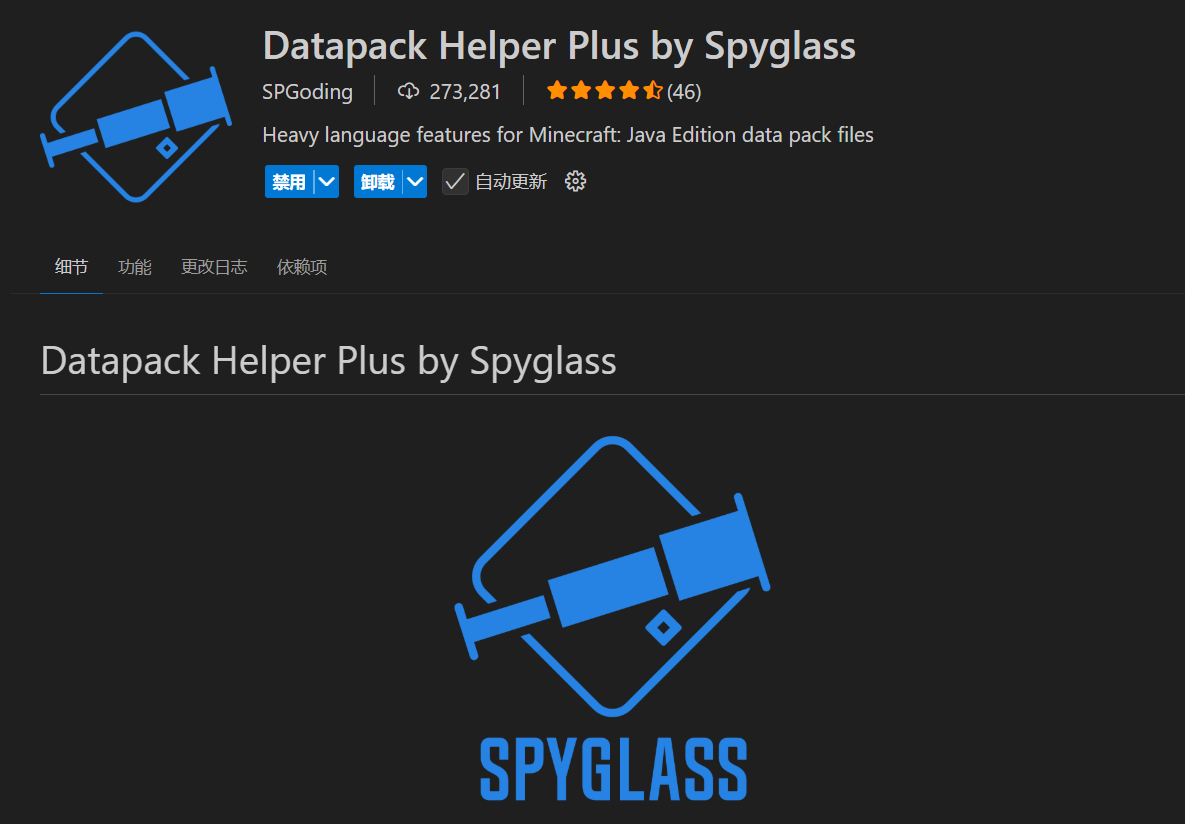
data pack plug-in is ready, the audio file is ready, the cover map is ready
Let us start to create a new folder for the resource pack and configure the resource pack parameters
Let us return to Resource Manager, right-click in the workspace, select New Folder, give him a full of love name
! This is a Hakimi resource pack

Next, create and rename the following files/folders in this Hakimi music resource pack folder
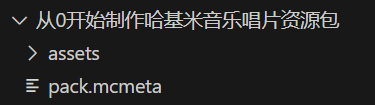
Among them, pack.mcmeta is the introduction file of the resource pack, which contains the version information and description of the resource pack
Write the following content into it
{
    "pack": {
        "description": "A hajimi music disc resource pack",
        "pack_format": 61
    }
}
Let’s take a look at the key names
- description - the description of the resource pack, introduce to the little Hakimi what the resource pack is used for
- pack_format - the version of the resource pack, the specific value can be obtained from the wiki
If you have a resource pack cover, please place it in your favorite resource pack folder and rename it to pack.pngPretend I have a picture of Hakimi
Next, target our assets folder and create our resource pack namespace folder inside it
! There are too many Kimi to break

Remember this folder named hajimi. Most of our subsequent operations will focus on hajimi - this everyone's favorite <namespace>. Expand
and return to our favorite operations: Create new files and folders. Continue to create the following files and folders

Next, put the Hakimi music into the sounds folder. In order to distinguish the various Hakimi, here I named the music file hajimisic.ogg
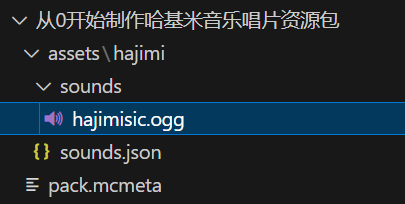
The new operation is over for the time being. As a result, you have learned how to make a resource pack (adding more sound effects to the game). Now you will officially enter the data pack breathing tutorial
1.2
- Define sound events
See resource pack on the wiki Page got the following information
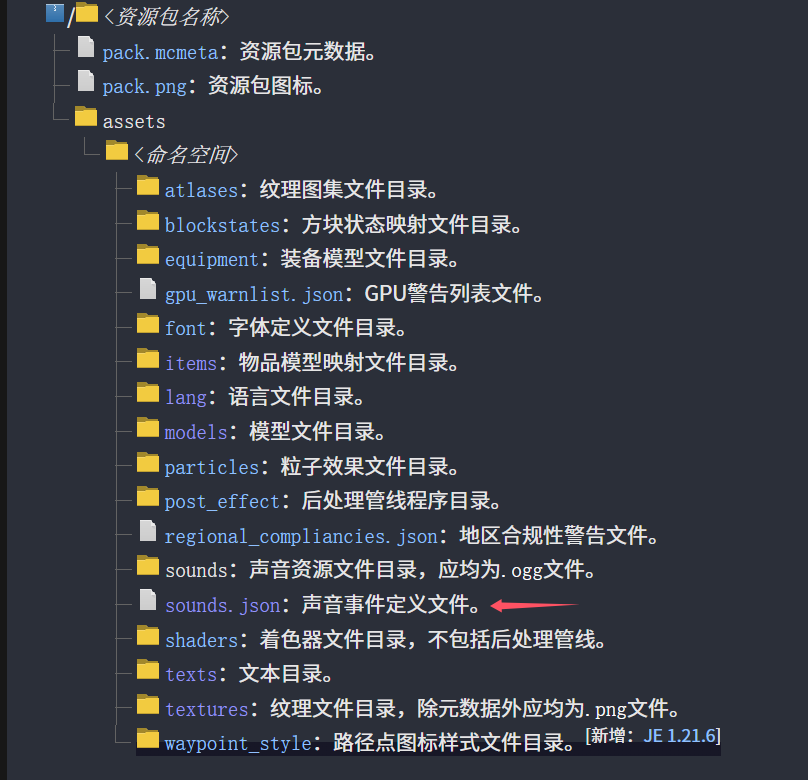
Among them, the sounds folder is the folder where our Hakimi music files are stored, and the sounds.json file tells MC that we have such music, what is its name key name, which music file should be played (or which music event should be called)
Check the wiki, about sounds.json Got the following information
! Too many hakimi, my head feels dizzy

I believe you, the smart one, must understand Smart Hakimi has already begun to sigh, what? Don’t understand? It doesn't matter, all we need to use is the name, stream and subtitle under the sounds json array * (optional) *
Open our sounds.json, my God, why is there not a hakimi here? Let's add content that can be breathtaking!
Do you remember the format you just learned in the wiki? Don’t remember? You Hakimi... Sure enough, you still need to teach someone step by step?
Then type the following
{
  "disc.hajimisic": {
    "sounds": [
      {
        "name": "hajimi:hajimisic",
        "stream": true
      }
    ],
    "subtitle": "哈基米:哈气"
  }
}
Do you understand? In this way we define a file calledhajimi:disc.hajimisicMusic event, where hajimi is the namespace of the resource pack, disc.hajimisic is the name of the sound event. This music event calls the music file named hajimisic located under the resource pack of hajimi. There will be subtitles when calling (the one in the lower left corner of the player screen) Hakimi: Hajimisic The various key names that appear
have the following functions
- disc.hajimisic - the "name" of the sound event, which we will use when using it
- sounds - the sound being called, that is, what "sound content/sound unit" our sound event contains
- name - The "name" of the audio content
- stream - streaming media playback, because the playback time of our audio files is too long (audio of 60s+ is generally considered to be long audio), our haha audio has a full 99 seconds! So fill in true for this item (if your audio is a short audio, you don’t need to fill in this item)
- subtitle - When playing the audio, the subtitle prompt content in the lower right corner of the game (for example, Sheep: Eating grass)
At this point, congratulations on taking the first step to breathe. Next, how to use the data pack to call this resource pack in the game
Are you ready? Let's keep breathing!
2
- Making album data pack
The great Mojang asked us to define the sound event. God said: We need to define
for the second time. So the believers data pack authors have to define the same sound event twice
2.1
- Create a new folder? Create a new folder
without going into details. Check the wiki to get the following file structure:
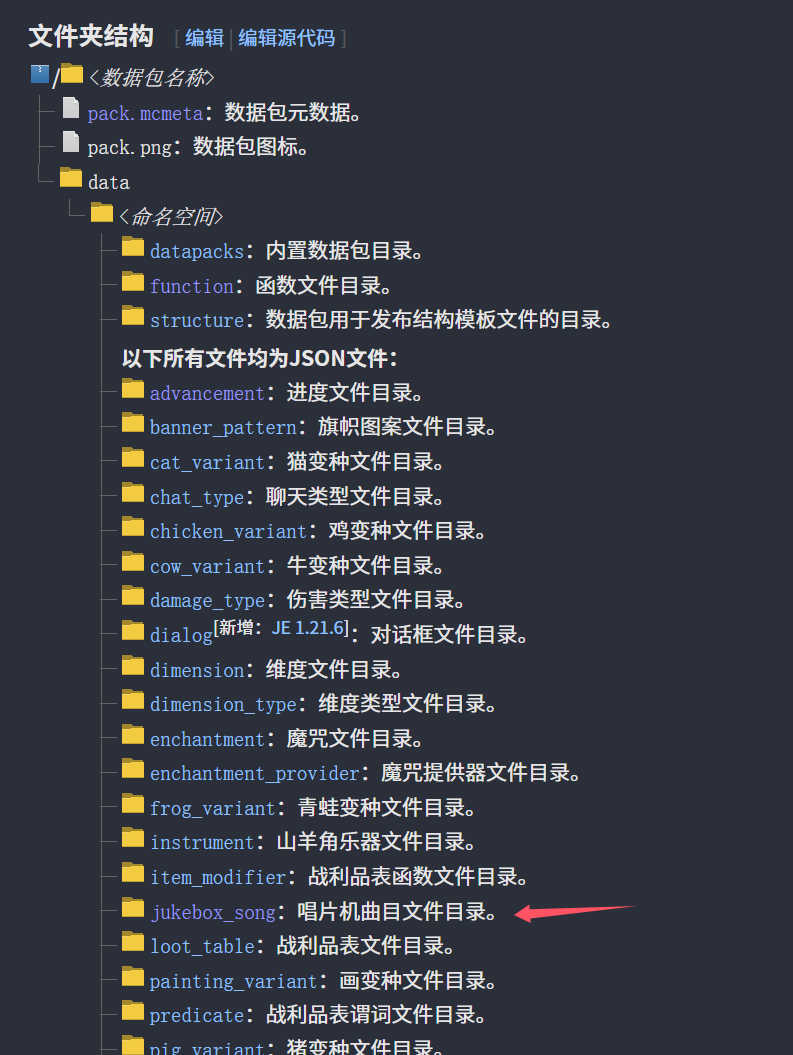
Except for the data pack elements (pack.mcmetadata pack information, pack.pngdata pack icon)
For the data pack information (pack.mcmeta), check the wiki and get itI still pretend that I already have the data pack cover image
{
    "pack": {
        "description": "A hajimi music disc datapack",
        "pack_format": 61
    }
}
looks familiar, right? The structure is exactly the same as the resource pack! If you forget, let's take a look at the key name
- description - the description of the data pack, introduce to the little Hakimi what the data pack is used for
- pack_format - the version of the data pack, the specific value can be obtained from the wiki
In addition, the easy to get jukebox_song is the key point haha The object is newly created decisively! (Remember to breathe)
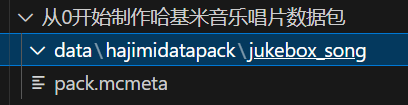
2.2
- Define the record player track
and then go to the wiki to check the jukebox_song entry ~~Why can't Vscode have a built-in wiki? ~~
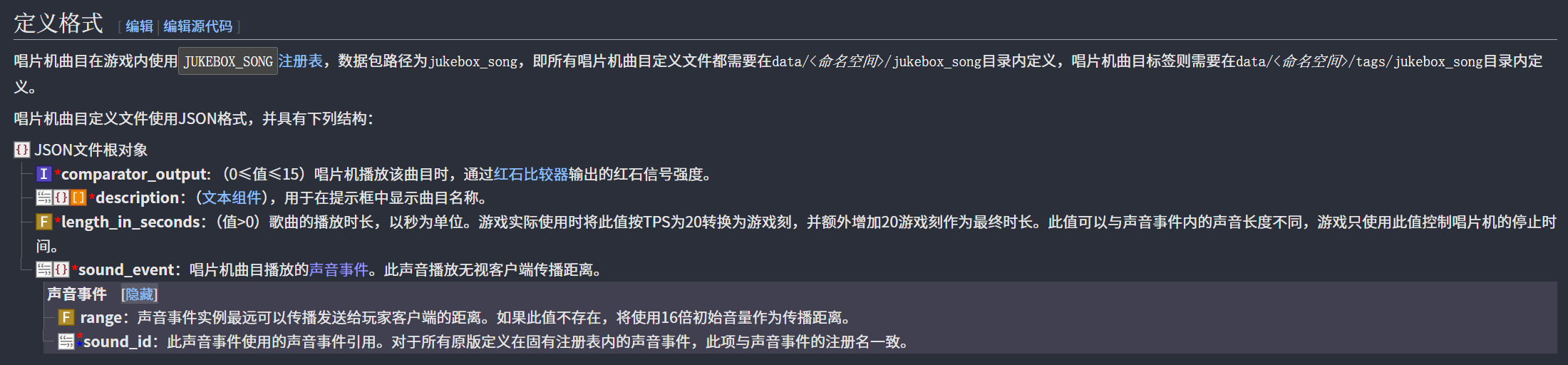
Why are there so many required entries? Write! (Named here hajimi_song.json)
{
  "comparator_output": 0,
  "description": "哈基米想要哈气",
  "length_in_seconds": 99.0,
  "sound_event": {
    "sound_id": "hajimi:disc.hajimisic"
  }
}
Good! Finished! Let’s take a look at the parameters.
- comparator_output Redstone output strength? It has nothing to do with breathing, don’t worry about it
- description What is the name of the track to be played? Just write the song title
- length_in_seconds audio length? Is the audio length (unit: seconds)
- sound_event sound event? Sound event!
Remember the sound event in [1.2
- Define Sound Events](#1.2
- Define Sound Events)? The sound id we want to quote is that one!
hajimi:disc.hajimisicFill in!
The sound event id ishajimi:disc.hajimisic, you can use /playsound to play to the player, and the album track ID ishajimidatapack:hajimi_song
In order to facilitate the management and writing of more hajimi Please change the naming of all the same tracks to the unified hajimi, here just to demonstrate the different naming methods of different hajimi
Finally let’s take a look at the structure of the data pack

Isn’t it very simple?
data pack ends here But does all the fuss end there? not yet!
2.3
- Calling a custom record in the game
The great Mojang, after the believers went through all kinds of hardships, said: sound events are defined three times So all the believers went crazy...
Now everything is ready, except to quote this record track in the game. How to do it? Or check the wiki! (Salute to the great wiki god)
In the data component entry, there is such a component jukebox_playable (updated on 24w21a)
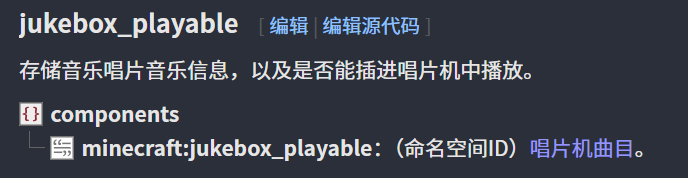
I feel like it’s very easy to write!
#1.21.4
give @s diamond[jukebox_playable={song:"hajimidatapack:hajimi_song"}] 1#1.21.5
give @s diamond[jukebox_playable="hajimidatapack:hajimi_song"] 1Give yourself one to playhajimidatapack:hajimi_songof diamonds!
This is for you, thank you for following along to get here!