
Translation notice
This page was translated with machine translation and may contain inaccuracies. If you can help improve it, please open an issue or submit a pull request.
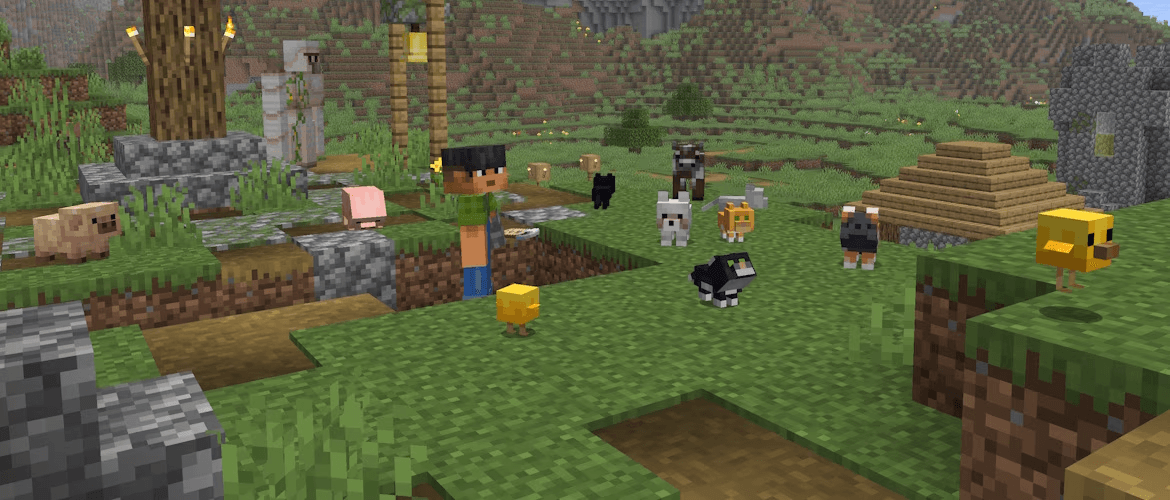


Vanilla News - Mojang Spotlight - January 2026
Here is Vanilla news, the most Vanilla technical snapshot news in Minecraft. Our reporter Vanilla Fox reports the latest snapshot news for you~
Mojang released a total of three snapshots this month, namely snapshots 1-3 of 26.1. 26.1 is also the first version of Minecraft to use the new version number rules. Currently, the data pack version has reached 97.0, and the resource pack version has reached 78.0.
A lot of interesting content has been updated this month, including data-driven villager transactions, new lighting-related environmental attributes, and new world clock functions, etc.
Let’s talk about the conclusion first. This month’s update is less destructive and more practical. It is generally at the Super Large Cup level.
Villager transaction data driven
In 26.1-snapshot-1, trade options for villagers and wandering traders were data driven. Villagers' transactions are now mainly controlled by two registration items, namely the transaction blueprintvillager_tradeand transaction settrade_set。
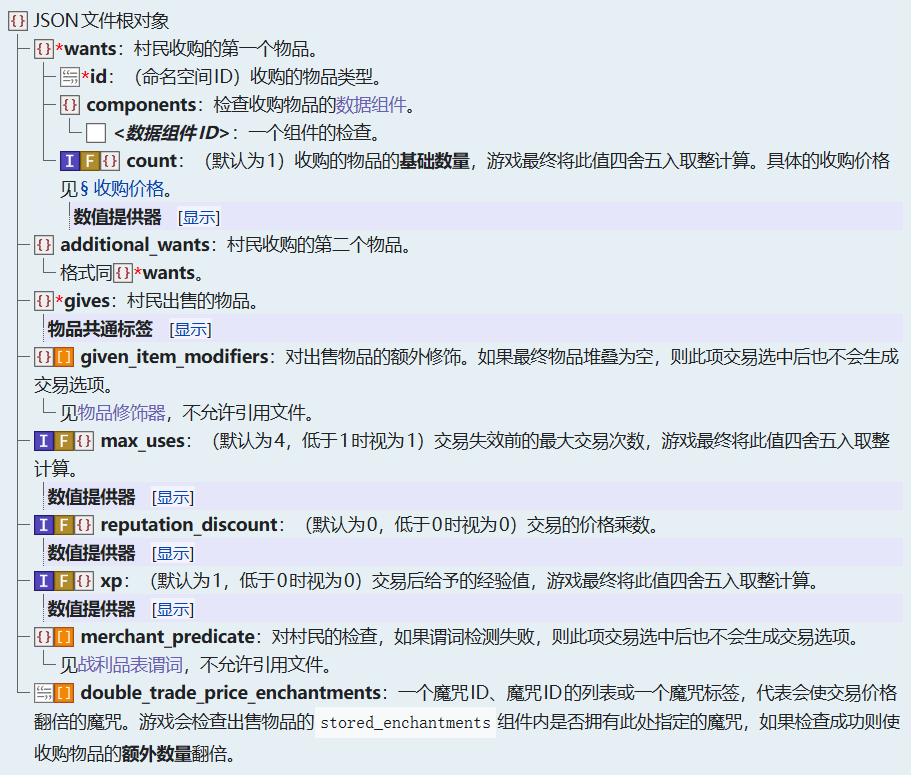
villager_tradeRegistration item, that isdata/命名空间/villager_tradeEach json file in represents a transaction blueprint. Villagers and wandering traders generate trades based on trade blueprints. Its definition structure is as follows:
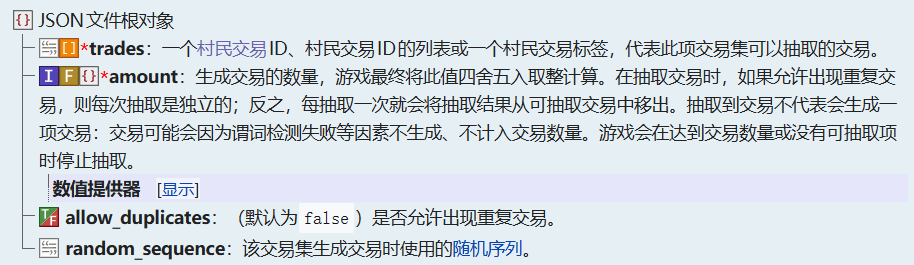
trade_setdefines the transaction combinations provided by villagers. However, this definition is currently hard-coded and can only cover the existing vanilla transaction set. The current transaction set defined by vanilla includes transactions for villagers of corresponding levels in corresponding professions.<profession>/level_<level>, and for wandering traderswandering_trader/buying,wandering_trader/uncommonandwandering_trader/common. Its definition structure is as follows:
usereloadThese two registration items cannot be reloaded, and the server must be restarted (exit the world and re-enter in single-player mode).
Lighting environment properties
In 26.1-snapshot-1, environmental attributes related to lighting were added, which means that changes in environmental lighting can be controlled in different mob groups or different time periods.
The current lighting environment attributes are:
minecraft:visual/block_light_tint
The RGB value controls the hue of the block lighting. The block lighting color is gray in low light, tinted by this property in medium light, and white in high light. By default, it takes on the yellow hue of a torch. All light sources on the current screen will be affected by this property, and the color cannot be specified for each light source. If different block lighting tones are defined in different mob groups, the color of the light source seen by the player will only be related to the mob group where the player is located, and will not be related to the mob group where the light source is located. The following attributes are the same.
minecraft:visual/ambient_light_color
RGB value. Control the color of ambient lighting.
minecraft:visual/night_vision_color
RGB value. When the player has night vision effects, useminecraft:visual/night_vision_colorandminecraft:visual/ambient_light_colorThe maximum value in the three RGB channels is used as the final color.
world clock
The world clock (World Clock, the translation has not yet been determined) is a newly added mechanism in 26.1-snapshot-3. Previously, there was actually a built-in world clock, which was used to control the day and night cycle, the behavior of the timeline, etc., which could be usedtimecommand control, but now, the world clock is completely data driven, in the namespace folderworld_clockThe json file defined in the directory is a world clock. The definition structure of world clock does not contain any fields, which means you only need to write one in your json file{}That’s it.
With the addition of the world clock, many changes and enhancements have been made.
For timelines, it is now possible to useclockfield specifies which world clock the timeline is using, useminecraft:overworldIndicates using the vanilla built-in default world clock, which is consistent with the default behavior of the previous timeline. In the definition of dimension type, a newdefault_clockOptional field to specify which world clock this dimension will use, that istimeThe clock controlled by command.
timeCommand also underwent a round of enhancements following the world clock. originaltimeThe behavior of the command will control the default world clock of the current dimension (default_vlockfield specifies the world clock). At the same time, you can also usetime of <clock>Control a specific world clock. also,timecommand can now control the pausing and resuming of the world clock. usetime [of <clock>] pauseTo pause the world clock, usetime [of <clock>] resumeContinue the paused world clock.time addandtime setThe return value of the command also becomes the total number of ticks passed by the world clock being operated on, rather than the current time.
swingcommand
swingCommand is a newly added command in 26.1-snapshot-1. As a small toy, it can control the arm swing animation of entities that support this animation, such as player models and zombies.
command format:/swing [<targets>] [mainhand|offhand]
Miscellaneous
Added item modifier:
minecraft:set_random_dyes: If item is in#dyeabletag, set the item'sminecraft:dyed_colorData component.minecraft:set_random_potion: Randomly set items from the given listminecraft:potion_contentsData component.
Modified item decorator:
minecraft:enchant_with_levelsandminecraft:enchant_randomlyAdded Boolean fieldinclude_additional_cost_component, indicating whether to increase the item according to the cost of the spellminecraft:additional_trade_costcomponents.
Added to entitypredicate's player subpredicatefoodFields used to check the player's hunger and saturation levels.
lightmap.fshbeen significantly modified.
Please check the update log for more details~
- 26.1-snapshot-1:<https://zh.minecraft.wiki/w/Java版26.1-snapshot-1>
- 26.1-snapshot-2:<https://zh.minecraft.wiki/w/Java版26.1-snapshot-2>
- 26.1-snapshot-3:<https://zh.minecraft.wiki/w/Java版26.1-snapshot-3>