
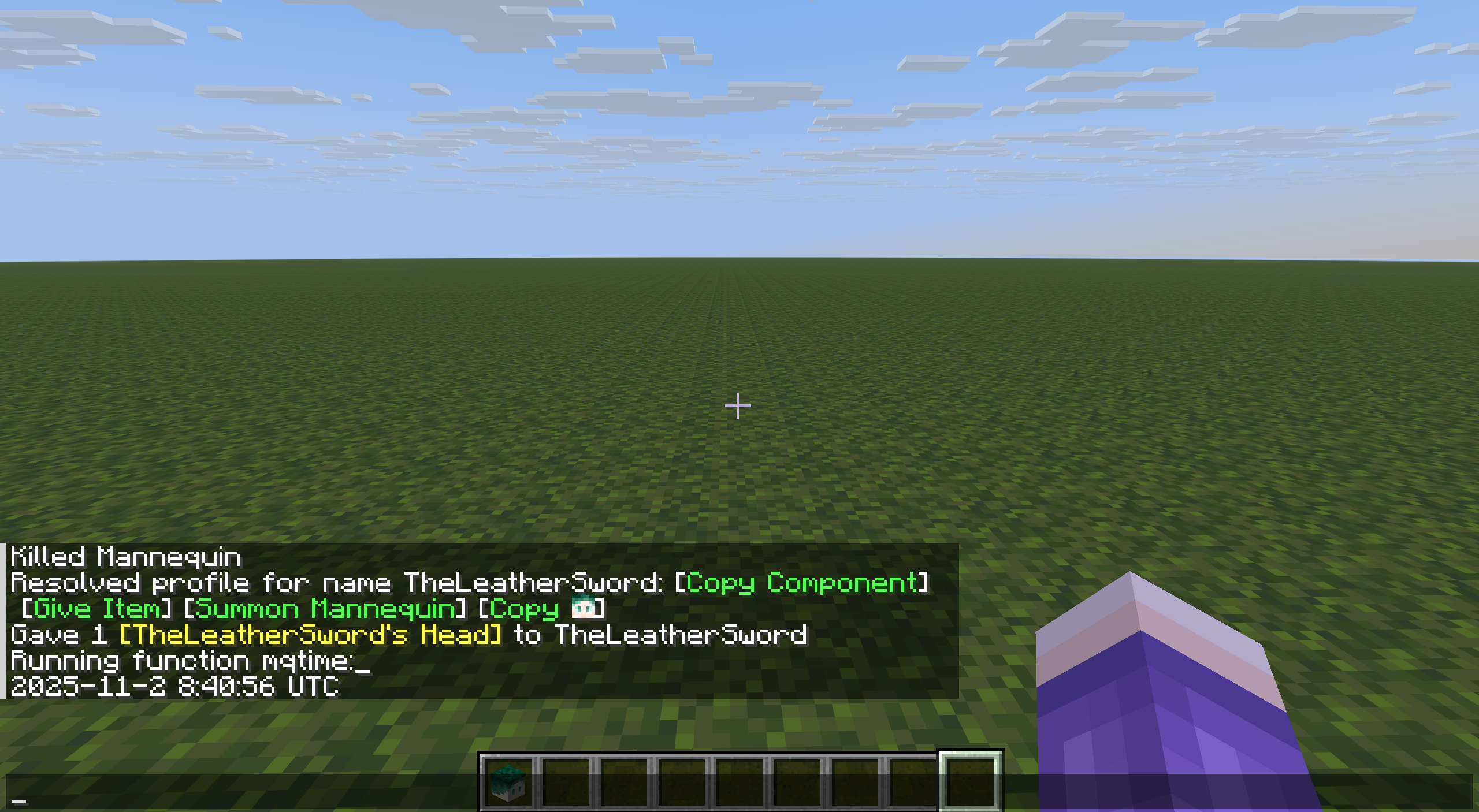
使用头颅/玩家档案信息半自动获取Unix时间戳
前言
书接10月刊本人文章。巨佬 @七柏 在某一天提到说他听说过一个“十分古老的”时间获取方案——使用头颅数据获取Unix时间戳。
他提到,玩家头颅会向官方服务器请求一系列信息,其中存在一个精确到毫秒的Unix时间戳。
不过情况是,这个时间戳始终被包含在一个base64字符串中而并不能直接被命令取用,提及该方案时也没有提到方案究竟是如何实现的。
不过既然只是base64的话......那对我来说好像不一定是难事?
观前提示: 该方案在25w34a之后为半自动方案,即需要一位玩家配合才能正常进行。
同时,由于该方案使用计分板(int范围)处理时间数据,该方案会受到2038年问题的影响。
在2038-01-19 03:14:07 UTC之后阅读该文章并尝试实现者,后果自负。
一、头颅数据的变迁
自定义玩家头颅自Java版12w37a加入,从13w36a起由于/give命令的加入而能够在原版使用。 自此之后的很长时间,玩家头颅的存储格式一直没有改变。一直到24w09a之前,结构基本如下:
 根标签。
根标签。
SkullOwner: 头颅对应的玩家名称。该项将立即被转换为下面的复合项。SkullOwner: 头颅对应的玩家的具体信息。
Id: 以4个int整数方式存储的玩家UUID,以防玩家名称变更。Name: 玩家用户名,可选。用于引导下方项目的存放。若无则始终使用Steve纹理。
Properties: 玩家纹理相关索引的具体存放位置。- 其中一项(通常也就只有一项)。
Signature: 对Value项的电子签名,以base64存储。可选。Value: 从官方服务器获取的玩家皮肤和披风信息,以base64存储,内含JSON格式的内容。
24w09a更改了玩家头颅相关的数据,将其打包至minecraft:profile物品组件,大部分格式随之更改。(其实主要是大小写变更。)
24w10a则更进一步将头颅方块实体数据也变为相同格式。自此一直到现版本,结构如下:
profile: 头颅/假人对应的玩家名称。该项将立即被转换为下面的复合项。profile: 头颅/假人对应的玩家的具体信息。(注: 物品中该项键名为组件minecraft:profile)id: 以4个int整数方式存储的玩家UUID,以防玩家名称变更。name: 玩家用户名,可选。用于引导下方项目的存放。若无则始终使用Steve纹理。texture: 可选,可覆盖下方提供的皮肤纹理。cape: 可选,可覆盖下方提供的披风纹理。model: 可选,可覆盖下方提供的皮肤格式。properties: 玩家纹理相关索引的具体存放位置。- 其中一项(通常也就只有一项)。
name: 固定为值"textures"。signature: 对Value项的电子签名,以base64存储。可选。value: 从官方服务器获取的玩家皮肤和披风信息,以base64存储,内含JSON格式的内容。
25w34a是该方案必须降级为半自动实现的第一个版本。在这一版本的头颅和假人数据中,读者大概率只能看到下面这两种情况:
profile: 头颅/假人对应的玩家名称。该项将立即被转换为下面的复合项。profile: 头颅/假人对应的玩家的具体信息。(注: 物品中该项键名为组件minecraft:profile)name: 玩家用户名。若无或为空则始终使用Steve纹理。
其实,这一版本中,官方改动了头颅类玩家档案的存储逻辑,非必要情况下不再存储相关数据到头颅物品/方块实体中,以保证其可以反映玩家皮肤变更。
同时,加入了异步的/fetchprofile命令,该命令只能由玩家直接执行,可以获取到完整版本(静态)的profile组件、生成头颅物品或生成假人。
二、头颅数据中时间戳的具体处理
我们始终只关心"(minecraft:)profile".properties[0].value(前版本为SkullOwner.Properties[0].Value)位置存储的base64字符串。
将其解析后成为一个JSON文件,其格式如下:
{
  "timestamp" : 1762015601487,
  "profileId" : "xxxxxxxxxxxxxxxxxxxxxxxxxxxxxxxx",
  "profileName" : "xxxxxxx",
  "signatureRequired" : true,
  "textures" : {
    "SKIN" : {
      "url" : "http://textures.minecraft.net/texture/xxxxxxxxxxxxxxxxxxxxxxxxxxxxxxxxxxxxxxxxxxxxxxxxxxxxxxxxxxxxxxxx"
    },
    "CAPE" : {
      "url" : "http://textures.minecraft.net/texture/xxxxxxxxxxxxxxxxxxxxxxxxxxxxxxxxxxxxxxxxxxxxxxxxxxxxxxxxxxxxxxxx"
    }
  }
}一个非常振奋人心的消息是,在这个JSON文件中,时间戳是第一项,并且在此之前的字符数量是确定的:{\n "timestamp" : ,总共18个字符。 而这18个字符正好能够转换为固定的24位base64: ewogICJ0aW1lc3RhbXAiIDog。
继续看,时间戳固定为13位数字,前10位为Unix时间戳,后三位为毫秒数。不过由于对官方服务器的请求必然存在时间误差,本文的处理将丢弃毫秒信息而只处理秒。(注: Unix时间戳从2001年9月9号到2286年11月20号的范围内均为10位数字。)
也就意味着,通过截取base64字符串第24到第40位(对应源字符串的12位字符),我们可以从base64字符串上直接定位并只提取我们需要的东西。
三、Base64解析
Base64的编码规则是: 每3个字节会被重新分成4个6位二进制数,对应一个Base64符号。由于我们只固定取我们需要的16个字符并转成12字节的数据(其中也只会取10字节),我们可以不考虑末尾补位的情况。
我们能够通过字符串切片等方式轻松完成这些符号的数字识别。具体方法不再赘述,有需要的读者请移步本人11月刊文章的3.2节。
直接看代码:
函数tm:init/base64 (添加到minecraft:load标签)
scoreboard objectives add base64 dummy
scoreboard players set 64 base64 64
scoreboard players set 256 base64 256
scoreboard players set 10 base64 10生成函数tm:init/base64_chr的代码如下: (添加到minecraft:load标签)
with open('data/tm/function/init/base64_chr.mcfunction',mode='w',encoding='utf-8') as f:
    f.write('scoreboard objectives add base64_chr dummy')
    for i,ch in enumerate('ABCDEFGHIJKLMNOPQRSTUVWXYZabcdefghijklmnopqrstuvwxyz0123456789+/'):
        f.write(f'\nscoreboard players set #{ch} base64_chr {i}')
f.write('\nscoreboard players set #= base64_chr 0') # 需要处理Base64末尾补位的读者需要这一项。函数tm:base64_decode/_ (固定处理16个字符。)
data modify storage base64: output set value [B;]
function tm:base64_decode/__
function tm:base64_decode/__
function tm:base64_decode/__
function tm:base64_decode/__函数tm:base64_decode/__ (每一次读取4个字符并转换成3个字节的数据。)
scoreboard players set #temp0 base64 0
function tm:base64_decode/___
function tm:base64_decode/___
function tm:base64_decode/___
function tm:base64_decode/___

scoreboard players operation #temp1 base64 = #temp0 base64
scoreboard players operation #temp1 base64 %= 256 base64
scoreboard players operation #temp0 base64 /= 256 base64
data modify storage base64: output append value 0b
data modify storage base64: output append value 0b
data modify storage base64: output append value 0b
execute store result storage base64: output[-1] byte 1 run scoreboard players get #temp1 base64

scoreboard players operation #temp1 base64 = #temp0 base64
scoreboard players operation #temp1 base64 %= 256 base64
scoreboard players operation #temp0 base64 /= 256 base64
execute store result storage base64: output[-2] byte 1 run scoreboard players get #temp1 base64
execute store result storage base64: output[-3] byte 1 run scoreboard players get #temp0 base64函数tm:base64_decode/___ (读取一个字符。)
data modify storage base64: input.1 set string storage base64: input.0 0 1
data modify storage base64: input.0 set string storage base64: input.0 1
execute store result score #temp1 base64 run function tm:base64_decode/____ with storage base64: input

scoreboard players operation #temp0 base64 *= 64 base64
scoreboard players operation #temp0 base64 += #temp1 base64函数tm:base64_decode/____
$return run scoreboard players get #$(1) base64_chr四、数字组合
通过以上函数,我们获取了需要的10位数字的ASCII码,每位各减去48即为所需的数字。通过按位组合的方式即可还原出原有的Unix时间戳数值。
完成这一步后,计分板base64的计分项#temp0的值即为所需的Unix时间戳数值。
函数tm:timestamp_get/_
scoreboard players set #temp0 base64 0
scoreboard players set #i base64 0
execute store result score #temp1 base64 run data get storage base64: output[0]
data remove storage base64: output[0]
execute if score #i base64 matches ..9 run function tm:timestamp_get/__函数tm:timestamp_get/__
scoreboard players operation #temp0 base64 *= 10 base64
scoreboard players operation #temp0 base64 += #temp1 base64
scoreboard players remove #temp0 base64 48
execute store result score #temp1 base64 run data get storage base64: output[0]
data remove storage base64: output[0]
scoreboard players add #i base64 1
execute if score #i base64 matches ..9 run function tm:timestamp_get/__
五、Unix时间戳分析
Unix时间戳是从1901-01-01 00:00:00 UTC开始的秒数(注:处理Unix时间戳和UTC时间时多数情况下无需考虑闰秒),因此我们的分析将从这一时间开始。
函数tm:init/_ (添加到minecraft:load标签)
scoreboard objectives add tm dummy
scoreboard objectives add tm_year dummy
scoreboard objectives add tm_mon dummy
scoreboard objectives add tm_mday dummy
scoreboard objectives add tm_wday dummy
scoreboard objectives add tm_hour dummy
scoreboard objectives add tm_min dummy
scoreboard objectives add tm_sec dummy

scoreboard players set 4 tm 4
scoreboard players set 100 tm 100
scoreboard players set 400 tm 400

scoreboard players set 60 tm 60
scoreboard players set 24 tm 24

scoreboard players set 13 tm 13
scoreboard players set 5 tm 5
scoreboard players set 7 tm 7函数tm:datetime/_
scoreboard players set @s tm_year 1970
scoreboard players set @s tm_mon 01
scoreboard players set @s tm_mday 01
scoreboard players set @s tm_wday 4
scoreboard players set @s tm_hour 00
scoreboard players set @s tm_min 00
scoreboard players set @s tm_sec 00
function tm:datetime/year/_
scoreboard players operation #temp2 tm = #temp1 tm
function tm:datetime/month/_
function tm:datetime/mday/_
tellraw @s {translate:"%s-%s-%s %s:%s:%s UTC",with:[{score:{name:"@s",objective:tm_year}},{score:{name:"@s",objective:tm_mon}},{score:{name:"@s",objective:tm_mday}},{score:{name:"@s",objective:tm_hour}},{score:{name:"@s",objective:tm_min}},{score:{name:"@s",objective:tm_sec}}]}函数tm:datetime/year/_
execute store result score #temp1 tm run function tm:datetime/year/__
execute unless score #temp0 base64 >= #temp1 tm run return 0
scoreboard players operation #temp0 base64 -= #temp1 tm
scoreboard players add @s tm_year 1
function tm:datetime/year/_函数tm:datetime/year/__ (按照闰年信息返回当年的总秒数到#temp1。)
scoreboard players operation #temp0 tm = @s tm_year
scoreboard players operation #temp0 tm %= 400 tm
execute if score #temp0 tm matches 0 run return 31622400
scoreboard players operation #temp0 tm %= 100 tm
execute if score #temp0 tm matches 0 run return 31536000
scoreboard players operation #temp0 tm %= 4 tm
execute if score #temp0 tm matches 0 run return 31622400
return 31536000函数tm:datetime/month/_
execute store result score #temp1 tm run function tm:datetime/month/__
execute unless score #temp0 base64 >= #temp1 tm run return 0
scoreboard players operation #temp0 base64 -= #temp1 tm
scoreboard players add @s tm_mon 1
function tm:datetime/month/_函数tm:datetime/month/__ (按照存放在#temp2的闰年信息以及月份编号返回当月的总秒数到#temp1。)
execute if score @s tm_mon matches 2 if score #temp2 tm matches 31622400 run return 2505600
execute if score @s tm_mon matches 2 run return 2419200
execute if score @s tm_mon matches 4 run return 2592000
execute if score @s tm_mon matches 6 run return 2592000
execute if score @s tm_mon matches 9 run return 2592000
execute if score @s tm_mon matches 11 run return 2592000
return 2678400函数tm:datetime/mday/_
scoreboard players operation @s tm_sec = #temp0 base64
scoreboard players operation @s tm_sec %= 60 tm
scoreboard players operation #temp0 base64 /= 60 tm

scoreboard players operation @s tm_min = #temp0 base64
scoreboard players operation @s tm_min %= 60 tm
scoreboard players operation #temp0 base64 /= 60 tm

scoreboard players operation @s tm_hour = #temp0 base64
scoreboard players operation @s tm_hour %= 24 tm
scoreboard players operation #temp0 base64 /= 24 tm

scoreboard players operation @s tm_mday = #temp0 base64
scoreboard players add @s tm_mday 1
六、(另)由日期推算星期
星期运算其实不是取得时间戳之后必须完成的项目,所以本节仅作为有需要的读者参考。
以下公式(Zeller公式)可以自动化地由日期推算星期: (其中c和d分别是年份的前2位以及后2位,月份为1-2月时视为上年13-14。)
w = ( (c // 4) - 2 * c + d + (d // 4) + (13 * (mon + 1) // 5) + day - 1 ) % 7函数tm:datetime/wday/_ (目前未被其他函数调用。)
scoreboard players operation week_tmp_month tm = @s tm_mon
scoreboard players operation week_tmp_year tm = @s tm_year

execute if score week_tmp_month tm matches 1..2 run scoreboard players remove week_tmp_year tm 1
execute if score week_tmp_month tm matches 1..2 run scoreboard players add week_tmp_month tm 12

scoreboard players operation week_tmp_d tm = week_tmp_year tm
scoreboard players operation week_tmp_d tm %= 100 tm
scoreboard players operation week_tmp_c tm = week_tmp_year tm
scoreboard players operation week_tmp_c tm /= 100 tm

scoreboard players operation @s tm_wday = @s tm_mday

scoreboard players add week_tmp_month tm 1
scoreboard players operation week_tmp_month tm *= 13 tm
scoreboard players operation week_tmp_month tm /= 5 tm
scoreboard players operation @s tm_wday += week_tmp_month tm

scoreboard players operation @s tm_wday += week_tmp_d tm
scoreboard players operation week_tmp_d tm /= 4 tm
scoreboard players operation @s tm_wday += week_tmp_d tm

scoreboard players operation @s tm_wday -= week_tmp_c tm
scoreboard players operation @s tm_wday -= week_tmp_c tm
scoreboard players operation week_tmp_c tm /= 4 tm
scoreboard players operation @s tm_wday += week_tmp_c tm

scoreboard players remove @s tm_wday 1
scoreboard players operation @s tm_wday %= 7 tm
七、总体操作方案以及之后的时间维护
函数tm:_
data modify storage base64: input.0 set string entity @s Inventory[0].components."minecraft:profile".properties[0].value 24 40
function tm:base64_decode/_
function tm:timestamp_get/_
function tm:datetime/_在25w34a之前,以上操作可以通过直接/give玩家头颅或放置玩家头颅方块完成。 但25w34a的变更决定了只有玩家运行/fetchprofile并利用提供的链接生成的头颅物品/假人才拥有完整的静态档案信息,命令系统不再能够自动触及完整档案。
因此,我们改为使用半自动的方式,并使用本人10月刊文章介绍过的其他方式维护现实时间计时器。步骤如下:
- 向有管理员权限(权限为2以上)的玩家发送对时请求,诱导其点击含有以下链接的按钮: (注:尽可能让档案名称特别一些,避免玩家背包中已有对应头颅。但一定要保证该玩家档案是存在的)
execute store result score ... ... run fetchprofile name ...- 执行了以上命令的玩家会自动设置特定计分板的分数为1,跟踪该计分板,若玩家执行了命令则立即同时使用命令方块方式进行一次时间获取。 (注:命令方块方式获取的时间信息中没有日期信息。但该时间是按照服务端所在时区进行偏移的,因此将用于时区识别。)
- 诱导玩家点击第一步产生的消息中的“给予物品”或“生成假人”按钮。
- 给予物品: 使用进度跟踪玩家背包,若发现新增了一个玩家头颅则提取该头颅的信息完成以上的整个过程。完成后,清除该玩家头颅(具体来说,是清除名称与获取的玩家头颅名称相同且拥有properties的头颅)以免下一次识别出现问题。
生成假人: 检查玩家当前位置是否有对应档案名称的假人,如有则提取该假人的档案信息。完成后,清除该假人。 - 对应时区: 比较获取的UTC时间与命令方块时间,其小时差别即为时区(但要注意部分国家可能更为精确到半小时时区)。
如UTC时间为13:20:01,同时的命令方块获取的时间为21:20:01,则可推知时区为东八区(UTC+8)。
如两个时间有秒级别的差别,说明存在请求时间误差,此时秒数以命令方块为准。 - 维护时钟: 显然反复向官方服务器发送请求不是什么好行为,并且由于该过程的半自动性,这样做也会打扰玩家。因此,请换用其他方式(如
/stopwatch或命令方块法)继续完成时钟维护。
参考文献
https://minecraft.wiki/w/Player_Head
https://minecraft.wiki/w/Player_Head?oldid=2387856
https://minecraft.wiki/w/Mojang_API#Query_player's_skin_and_cape
https://minecraft.wiki/w/Commands/fetchprofile
https://unixtime.org/
https://www.geeksforgeeks.org/dsa/zellers-congruence-find-day-date/
以及自引本人10、11月刊文章。