
Translation notice
This page was translated with machine translation and may contain inaccuracies. If you can help improve it, please open an issue or submit a pull request.
vanilla camera animation resource library
"Camera animation resource library" is a data pack module based on the spectator display entity and teleportcommand, and runs with pure command drive.
Supported version: Minecraft Java Edition 1.21.6+
Show and introduce video [MC data pack] vanilla camera animation support library
Design prototype
Bedrock Edition (Bedrock Edition) commandcamera
Camera Movement
Q: "Why implement camera movement in Minecraft?" vanilla camera animation resource library
A: "In the game, if there are only static scenes, the visual effects will not be smooth enough and appear mechanical. For the same scene, if the screen has moving lenses, the visual effects will be smoother and more natural."
Basic mirror movement
During film shooting, camera movement is often achieved through the following methods:
Push and pull the lens
Shake the camera
panning camera
Raise and lower lens
Shake the camera
Storyboard
**To improve picture quality, render atmosphere and create feelings, you can apply the following methods: **
Forward and reverse
Jump axis shooting
perspective principle
composition
montage technique
With the movement of the camera, the connotation of the animation is invisibly expressed through visual effects, enhancing the player's immersion and enriching the game's playability.
Features
data pack function
Cut-scene animations, bird's-eye view scene camera movement design
Skill animation camera design
Advantages of data pack
- Fluency
Compared with tp interpolation that directly observes the entity, data pack allows smooth curved motion. The interpolation matrix constructs a trajectory with continuous first-order derivatives and even continuous second-order derivatives, which is comfortable to look at.
- Convenience
Compared to AnimatedJava and other plug-ins generate camera movements, data pack can edit and preview the trajectory in real time, making it easier to use.
- Real time
Compared with command generation and plug-in creation and editing, the real-time preview function of data pack is extremely outstanding. Regardless of the track being saved or being edited, it can be previewed and debugged through a command.
How to use
Install the CameraMovement camera animation library
Latest versionV4.0
Download linkhttps://wwbol.lanzout.com/i1j6M3ip661a
To install into the archive, please see Minecraft Wiki data pack-use
Edit and play
Administrators and management items
- In the game, the player can use the following command to apply for an administrator at any time
trigger camera_animationAfter applying as an administrator, if there is space in the backpack, you will get the "Keyframe Tool" or "Free Animation Tool". Most of the following operations will take effect based on holding the "Keyframe Tool" or "Free Animation Tool" in your main hand.
Keyframe tools: used to create and edit trajectory animations. The position of the trajectory animation is fixed, just like a train track, and the camera can only move along a preset path.
Free animation tools: used to create and edit free animations. The position of the free animation is determined by the execution position of the playback function. You can see different camera paths when playing at different coordinates.
Create and edit
When holding the "Keyframe Tool" or "Free Animation Tool", the currently existing track will be displayed in the form of a sea crystal lantern (not selected) or a bacterium (selected). The selected track will display a preview (particle effect), and the keyframes will be displayed in the form of a detector.
Press E to open the backpack, and hover over the "Keyframe Tool" or "Free Animation Tool" to view the operation keys:
FCreate track
For the track (Sea Crystal Lamp/Bacteria Light), left-click to select it, and right-click to enter the editing page.
For keyframe points, left click is to move, right click alone is to set the orientation, left Shift (sneak) + right click to open the position setting panel
Press Q to delete a keyframe or recording segment
Shift+F opens the data pack settings panel
Save and play
The main functions are introduced in the panel displayed by default when entering the game.
save animation
function camera:save/this {id: xx}id: The standard serial number of the trajectory.
Standard serial number: right-click to open the track digital serial number in the title bar of the edit page, or the digital serial number in the name of the track entity (sea crystal lamp/bacteria light body)
Play animation
Trajectory Animation
Play an animation
function camera:play/this {id: xx, cmd: '', stay: xx, tp: [0或1]}stay: Start playing the trajectory animation after a certain game moment
cmd: Execute the command after the end (leave the empty string " " if not needed)
tp: Whether to send the player back to the position before playing after playing (0 means no transfer, 1 means transfer)
Play multiple animations
function camera:play/this {id: [1,2,3……], cmd: '', stay: xx, tp: [0或1]}- id: A list of standard serial numbers of multiple trajectories, separated by commas ",".
Free Animation
Play an animation
execute as entity positioned x y z rotated ry rx run function tween:play/this {id: xx, cmd: '', stay: xx, tp: [0或1], free: [x, y, z, ry, rx ]}Specifically control which player plays the free animation at which position, otherwise the function will be invalid.
free: a five-digit ordered number table, x y z ry rx respectively determine whether these five coordinates are free coordinates. Among them, the free coordinate of x y z represents the local coordinate ^ , and the non-free coordinate is the relative coordinate ~ ; the free coordinate of ry rx represents the relative coordinate ~ , and the non-free coordinate is the absolute coordinate ry rx .
For example, if y is locked as a non-free coordinate and x z ry rx is a free coordinate, then free: [ 1, 0, 1, 1, 1 ] is passed in, and the game execution is equivalent to the following modification.
execute positioned ^ ~ ^ rotated ~ ~Terminate animation
In debug mode only, the animation is forcibly cut off during playback
function camera:play/stop- After execution, the currently playing track animation will be forcibly cut off.
player settings
Development Features
enable
scoreboard players set #enable camera_animation 0- After a single use, the reload prompt to enter the game will be disabled, and other players will not be allowed to become operators.
Disable
scoreboard players set #enable camera_animation 1- A single use will enable the reload prompt to enter the game and allow other players to become operators.
playerplay
enable
tag entity add camera.enable- After execution, the player will enable animation playback, and the player can see the camera movement normally after executing the relevant functions.
Disable
tag entity remove camera.enable- After execution, the player will disable animation playback, and the player will not be able to see the camera movement after executing the relevant functions.
Uninstall and optimize
uninstall
function camera:uninstall/allThe above command will remove all contents of the data pack, including generated and saved trajectories, all scoring items and command storage.
After the prompt is successful, you can use the following command to safely uninstall the data pack, and then destroy the related items (keyframe tools and free animation tools)
datapack disable "[前置]CameraMovement V4.0 - 1.21.6+"optimization
- 1.Save
Q: "Why does the track I create get stuck?" A: "You can try saving the trajectory to greatly reduce entity lag."
Why use entity? Is it less laggy than command memory?
At the beginning of the development of data pack, markerentity was used in order to realize the trajectory preview function and computer performance issues were not considered. A large number of @e scans in the function will cause intolerable lags. The new save function can greatly optimize lags. See the above explanation for details.
*If the track still causes a lot of lag after saving, please be sure to contact the author for feedback! *
- Reduce rendering
Q: "My frame rate is just low, but the game computing is not stuck. Is there any lightweight optimization solution?" A: "You can try disabling track preview"
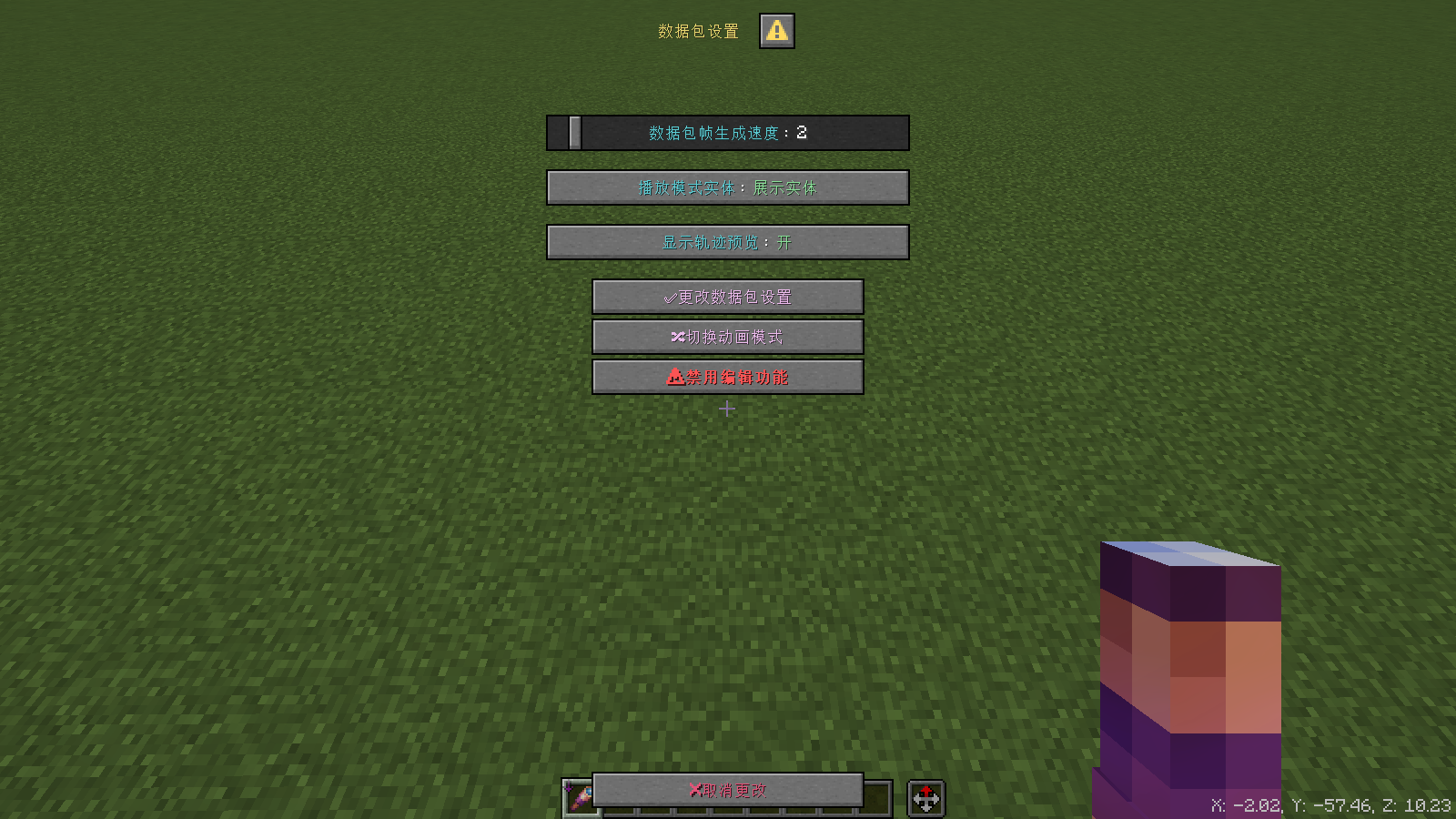
In the data pack settings panel opened by Shift+F, you can see the "Show track preview column". Set it to "Off" and save the settings to turn off the particle rendering display.
Detailed usage instructions
Bezier CurveEdit
Show video-How to use Bezier curve
Q: "Compared to the Catmull-Rom curve algorithm, the Bezier curve requires editing a large number of control points (key frames and interpolation frames), and the playback is laggy. How can I keep it in the data pack?"
A: "It is precisely because of the high editability of Bezier curves that you can build more complex motion functions by fine-tuning key frames and interpolation frames at the expense of convenience, and even achieve continuous second-order derivatives."
Between adjacent key frames, the camera movement is always tangential from the direction of the red wool to the key frame, and then tangentially away from the direction of the blue wool. Therefore, compared to the Catmull-Rom curve, its speed at the key frame is more controllable.
When editing Bezier curves, use the pen tool of the drawing software. Generally, the interpolation frames (control points on both sides) are arranged in three equal parts between two adjacent key frames to achieve a more stable speed and acceleration (curvature). The angle also needs to be controlled by ry (yaw angle) and rx (pitch angle) in the ball coordinate to evenly cross the spherical surface, so that the rotation can be closer to the short path curve of the spherical surface rather than the curved motion on the coordinate. For example, when turning from ( ry, rx ) = ( 0, -90 ) to ( 90, 0 ), the trajectory of the camera rotation is similar to a spiral, but in fact, the distance we want to turn our sight is smaller, so the blue wool corresponding to ( 0, 90 ) can rotate from ry = 0° to ry = 50°, while the red wool corresponding to ( 90, 0 ) only rotates from ry = 90° to ry = 75° Left and right, the final rendering is closer to the shorter path we want.
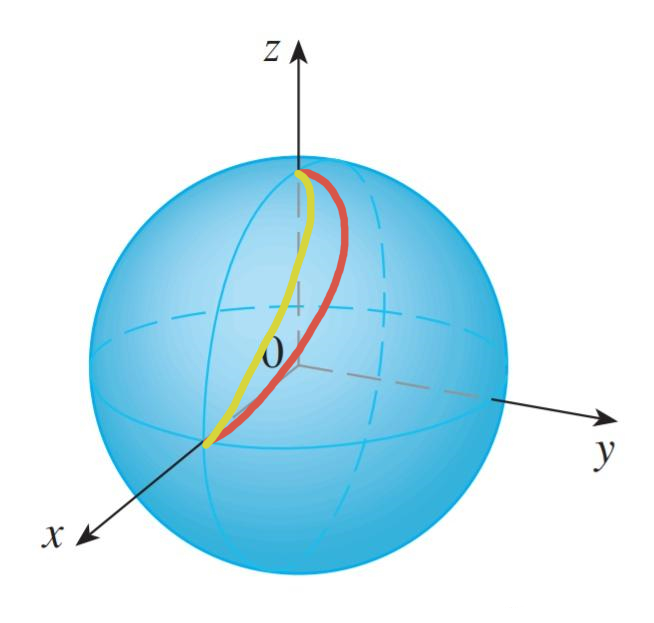
As shown in the figure, the red line is the path that the camera's line of sight will turn according to the coordinate method of thirds, and the yellow line is the path that the camera's line of sight will turn under visual restoration. The Catmull-Rom curve interpolation algorithm does not support independent control of the speed and angular velocity at each key frame, which causes the line of sight to appear unsmooth when the pitch angle is too large. Because of this, Bezier curves are particularly useful when dealing with complex rotations.
settings panel
Interpolation generation speed: Controls the number of interpolation frames generated per game tick. Lowering this item will help reduce the MSPT of the game and increase the interpolation frame generation time.
Playback entity: The entity that the player watches when the animation is playing. It is recommended to use the display entity, which has a smoother path interpolation algorithm. However, there is a probability of lag, which is a bug of the display entity. The armor stand will not playback lag, but its path is less smooth and has an obvious sense of frustration.
Track preview: Whether to enable particle display of the selected track path will slightly increase rendering pressure.
Switch animation mode: Switch between trajectory animation and free animation mode. In different modes, only the trajectory of this animation mode will be rendered.
Edit page
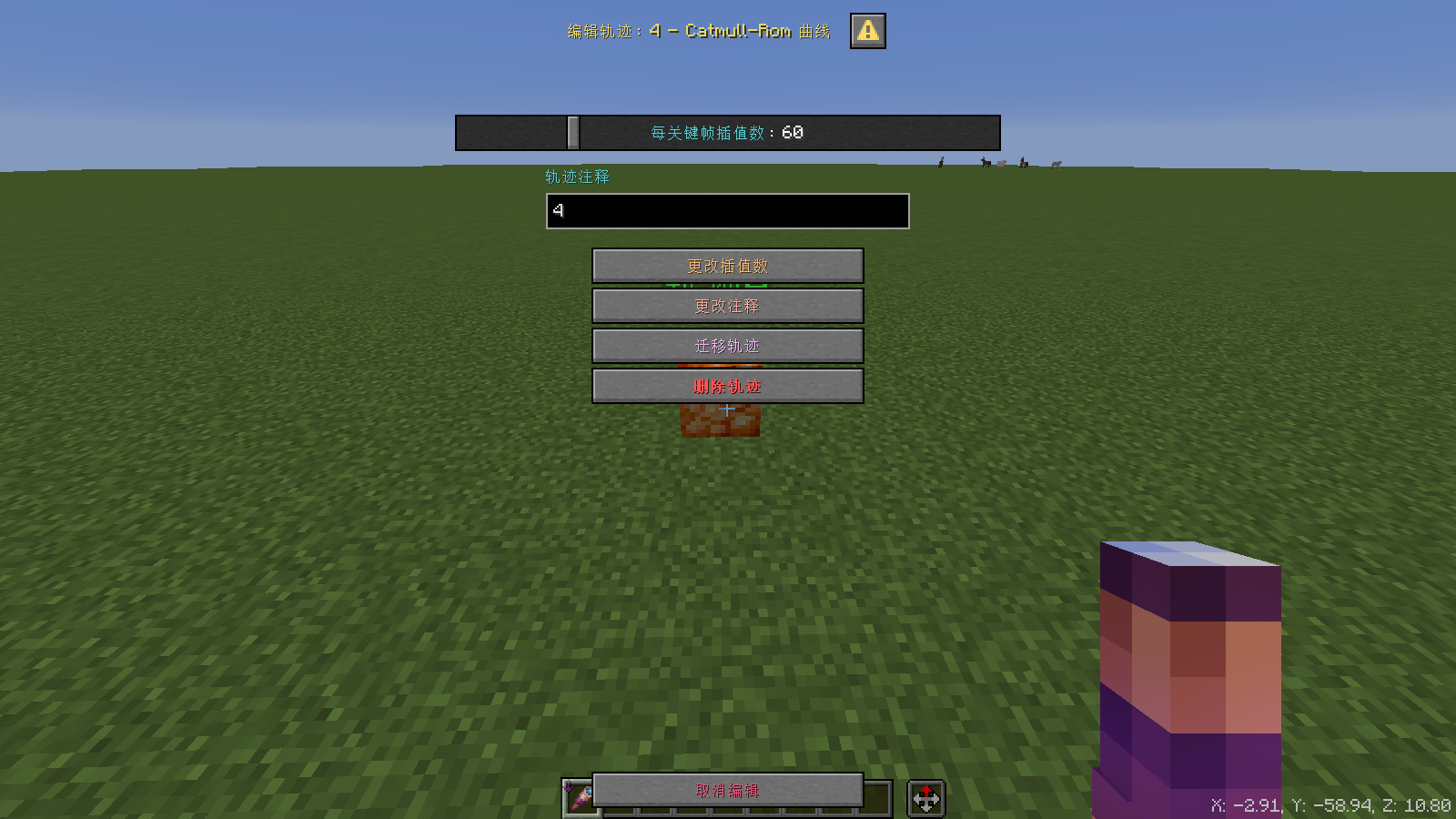
Change the interpolation number & modify animation information: The trajectory will be refreshed regardless of whether its value is equal to before the change, and the number of frames specified here will be generated between the two key frames. If you encounter an error in trajectory generation, you can use this button to refresh.
Change annotation: Modify the track annotation to the set value. The track annotation is only visible on the editing page and will not affect playback.
Migrating tracks: Changing the track standard serial number to other serial numbers can only be migrated to non-existing tracks. If migrated to a serial number that has not been generated in sequence, this track serial number will be ignored when generating (creating a track) in sequence.
Delete track: Clear the entity, score, and command storage corresponding to this track.
Easing function page
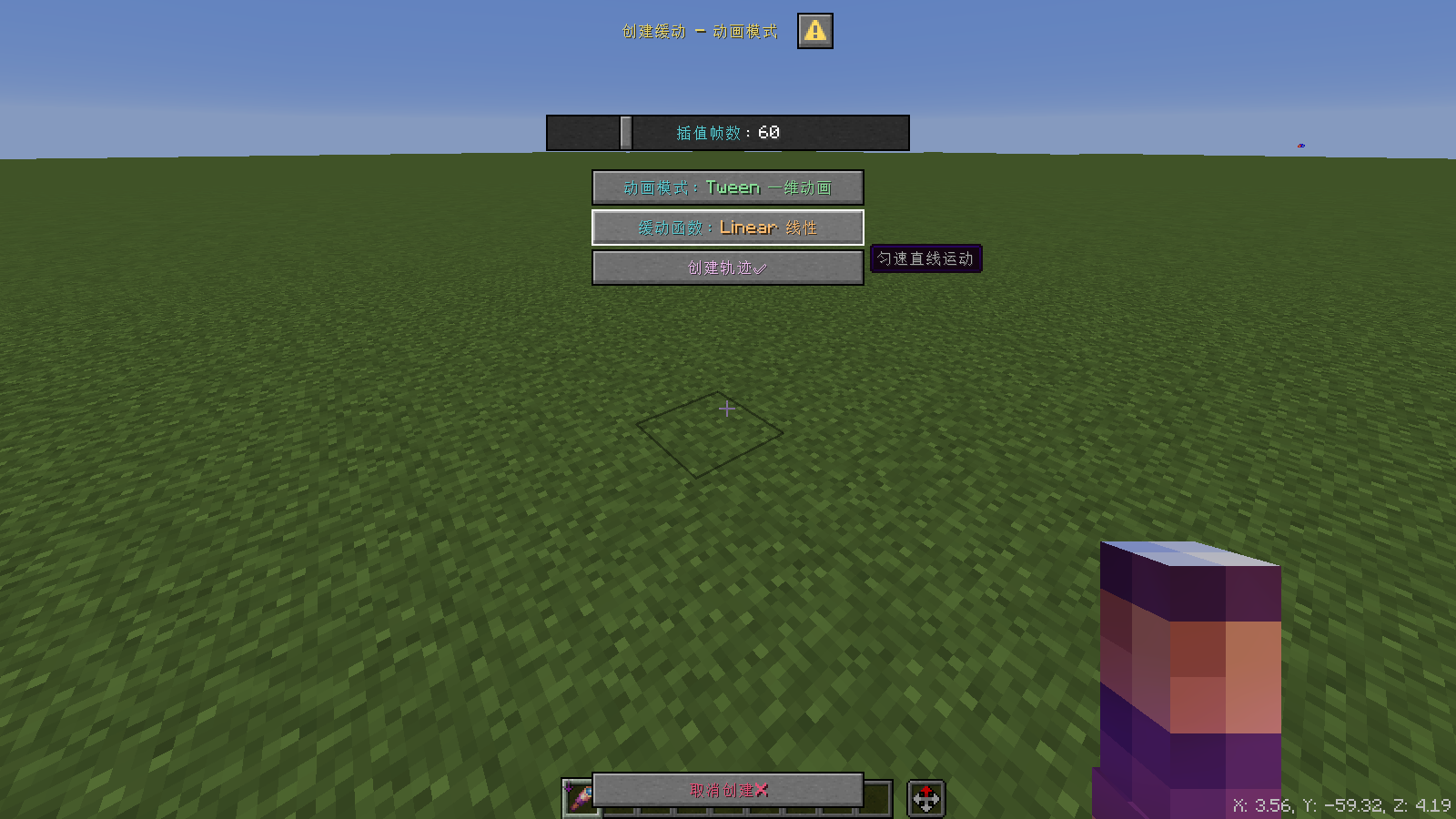
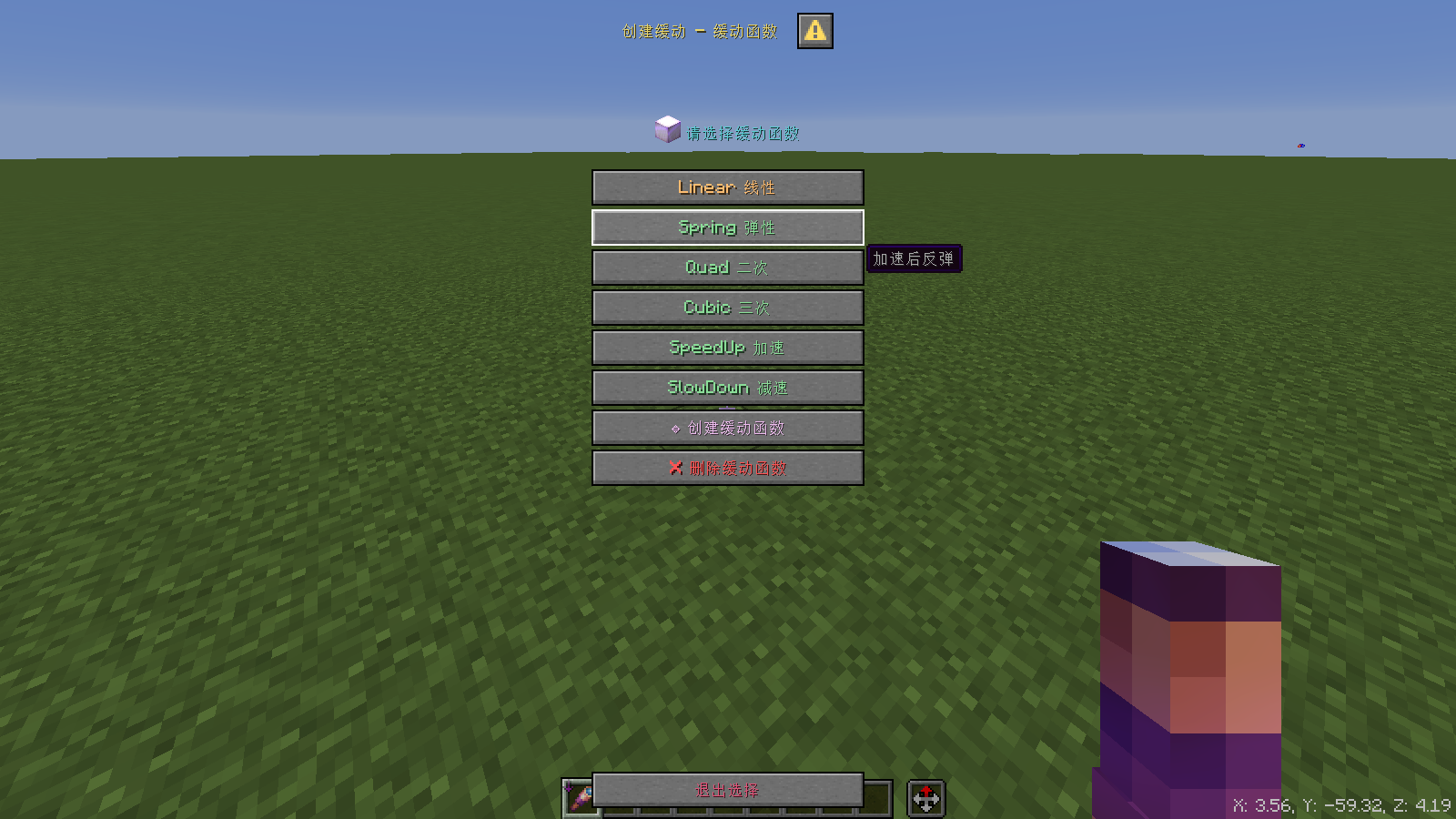
When creating a track with the F key, click the easing function name button on the easing function page to open the easing function list, as shown in the figure above.
Click to select the easing function in the easing function list, double-click to select and use it, which is equivalent to clicking and then clicking to exit the selection.
On the Create Easing Function page, there are the following two options:
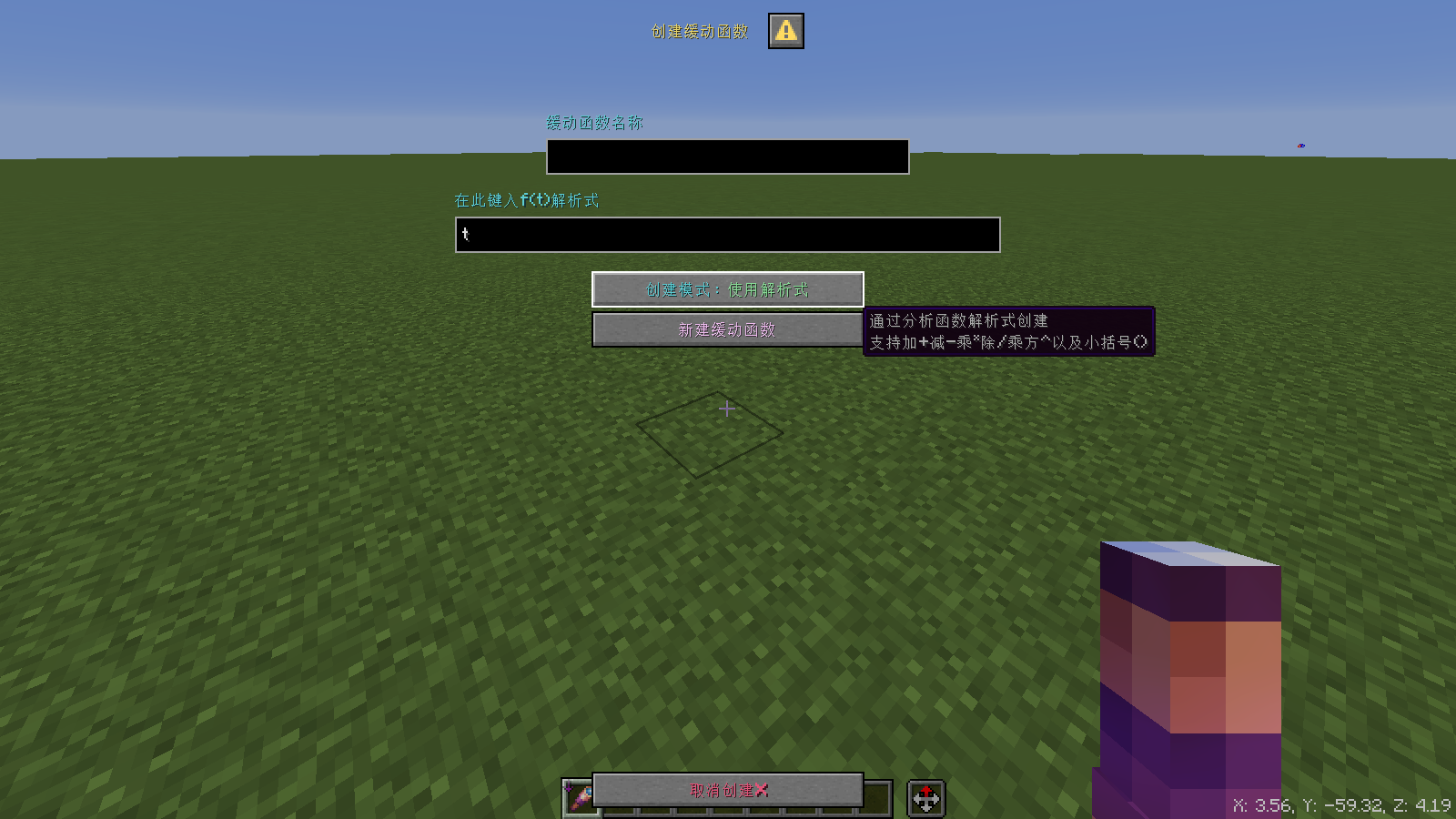
- Created analytically
Write the easing function analytical formula, supporting five operators and parentheses + - * / ^ (), as well as the constants e (2.71) π (3.14), where the natural constant e is represented by the lowercase letter "e", and the pi is represented by the lowercase letter "p".
White spaces are automatically ignored when written.
- Create via fixed point
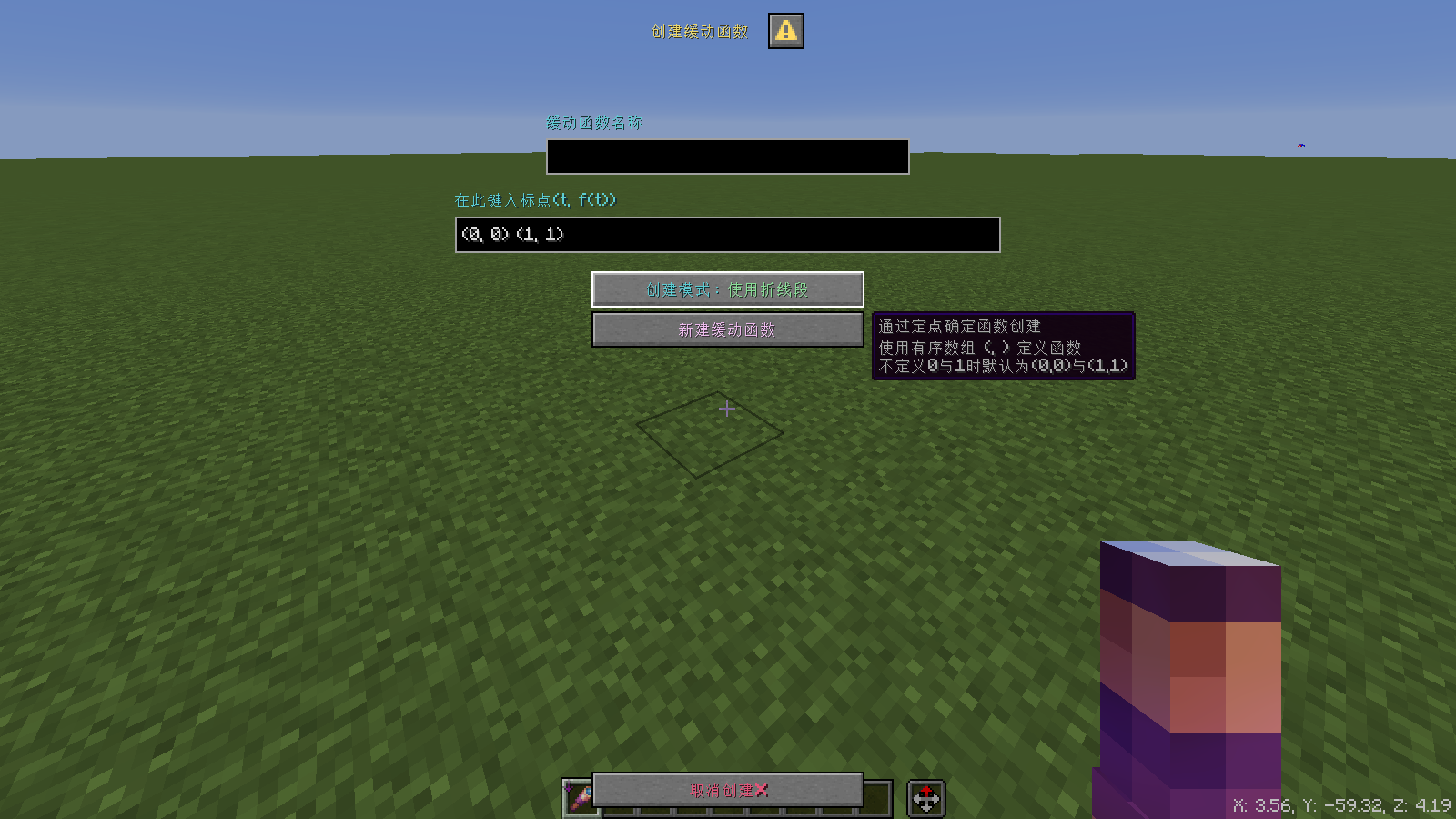
Use parentheses ( ) to surround the ordered binary array according to the following formula. The order of the independent variables is not specified and only needs to exist to determine.
White spaces are automatically ignored when written.
- For details on the easing function, see the link at the end of the article.
Principle derivation
Bezier curve
A first look at interpolation—starting with vectors
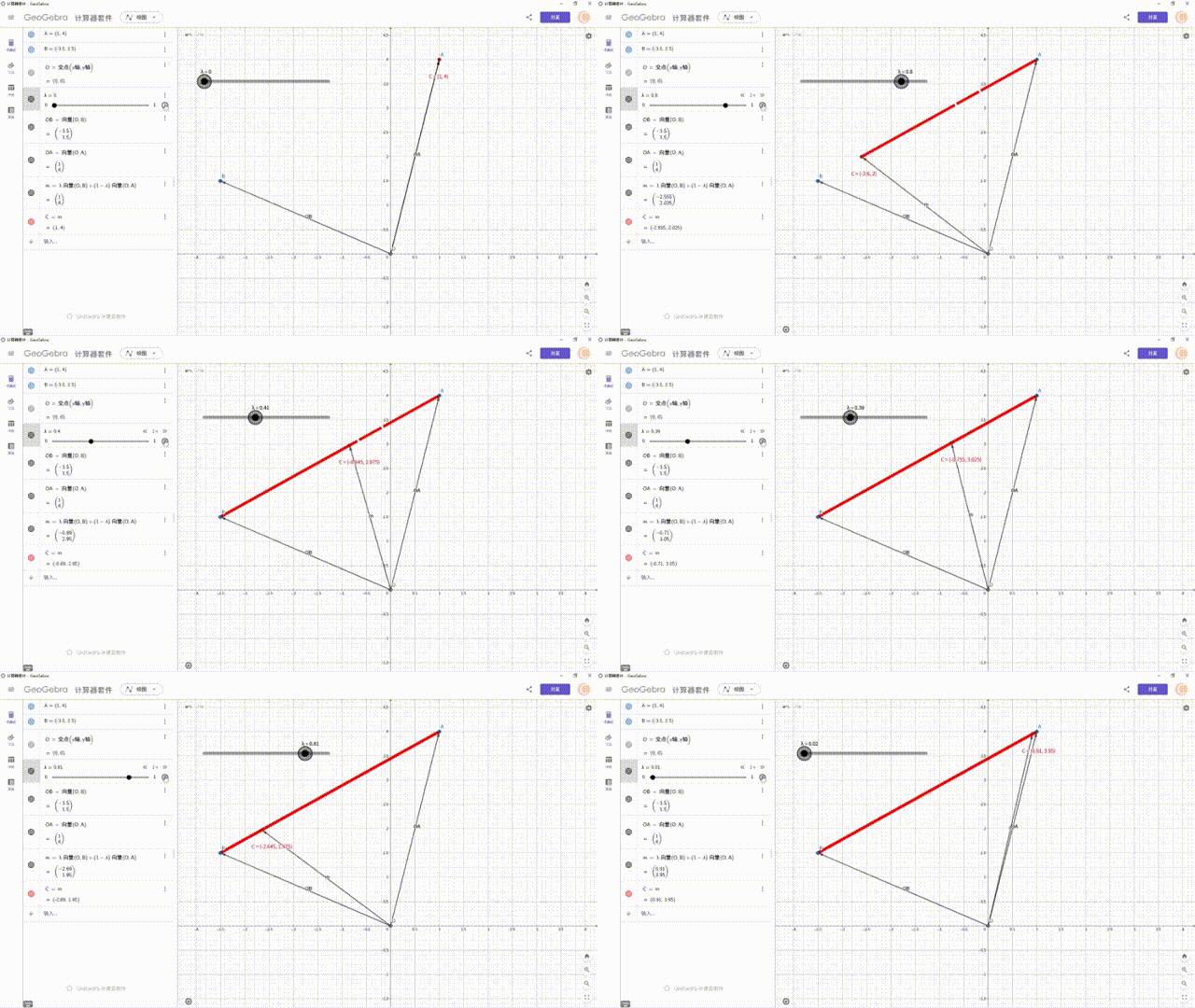
The sum of two vectors a and b can be obtained by changing the coefficients of a and b so that they are constant values, and a straight line can be obtained. If time t participates in the coefficients that constitute the vector, the most basic interpolation motion - linear motion is obtained:
The line segment generated when t steps from 0 to 1 is exactly. The line obtained by two points with different weights is called Lerpfunction, which is the starting point of all interpolation.
Higher order Bezier curve
Furthermore, how to make movement more controllable is similar to the concept of acceleration in physics. When the lens movement process conforms to the actual movement rules, the visual effect will be smoother.
Therefore, a simple smooth curve can be achieved by superimposing two Lerp interpolations:
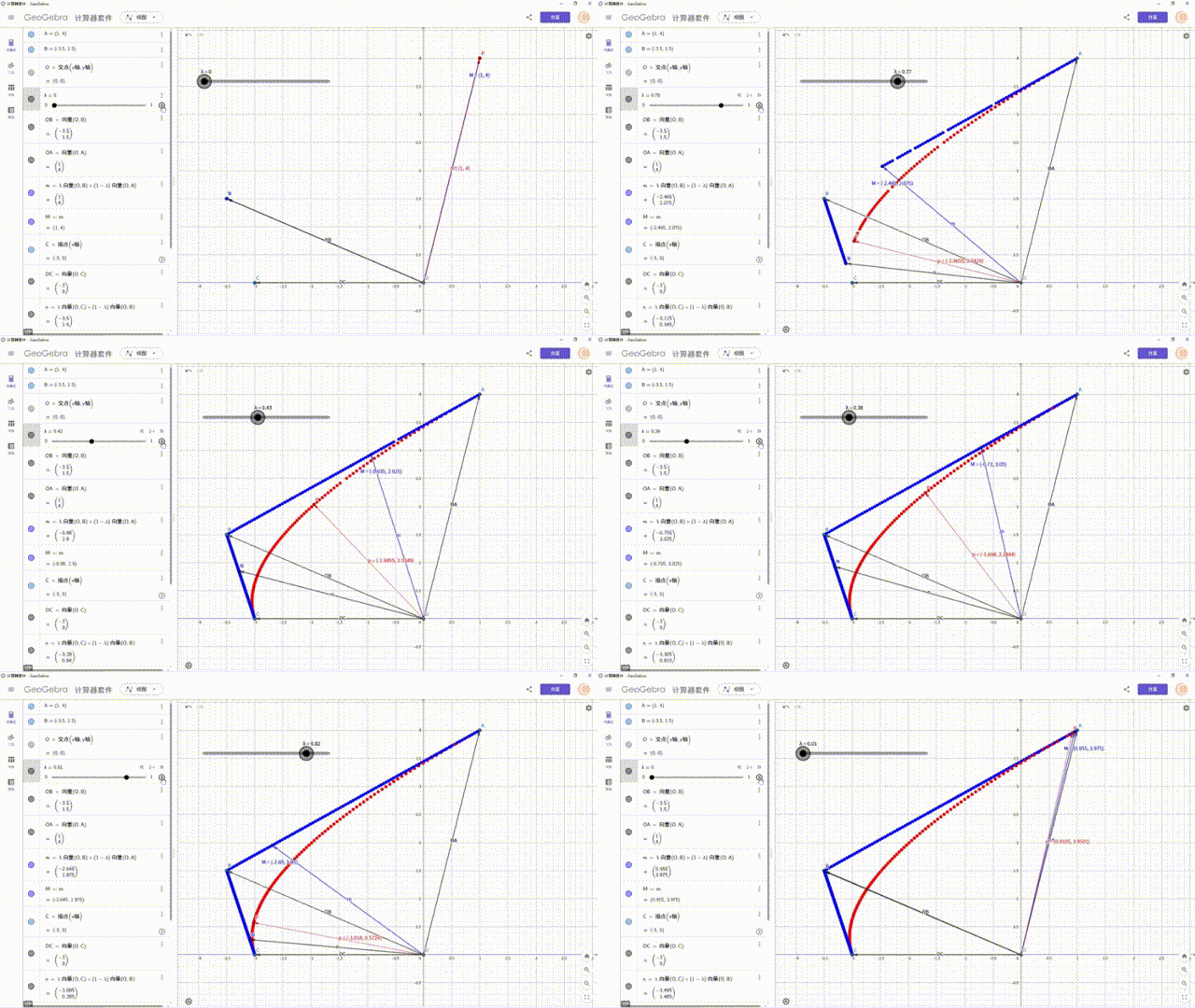
Following the above process, perform multiple motion superpositions. When there are control pointstime, calledOrder Bezier curve. It is not difficult to see that the curve is smooth and free enough. For a Bezier curve of order k, there are control points
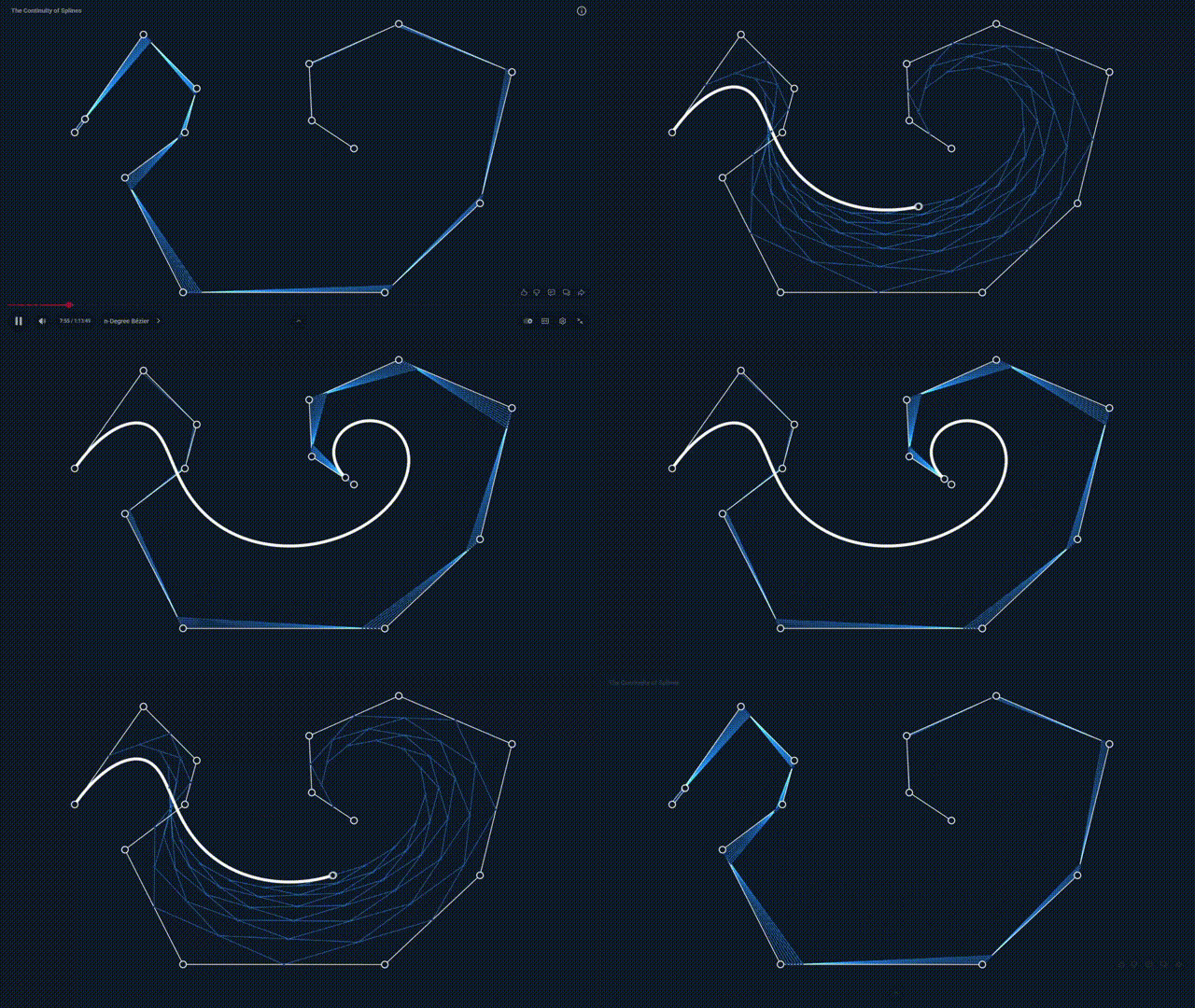
After use, people found that the three-stage segmented curve is the most practical, taking into account both smoothness and editability. Therefore, the following discussions are all third-order curves
interpolation matrix form
In another way of writing, write the polynomial function of the cubic Bezier curve with respect to t. When the control point ishour
To display more clearlydifferent times withrelationship, we write it in matrix form:
Now that we have the matrix form of a third-order Bezier curve, let's try changing the terms of the matrix. We will get different curves, which are collectively called splines.
Catmull-Rom curve
we will eachThe velocity direction at the point is defined as the previous pointGo to next pointdirection, size is。
Using the polynomial form of t, let the curve be, considering the trajectory fromarriveprocess.
by known conditions
can be solved
It follows from this
The shape of the curve is as shown in the figure below, whereis a parameter of [ 0, 1 ]
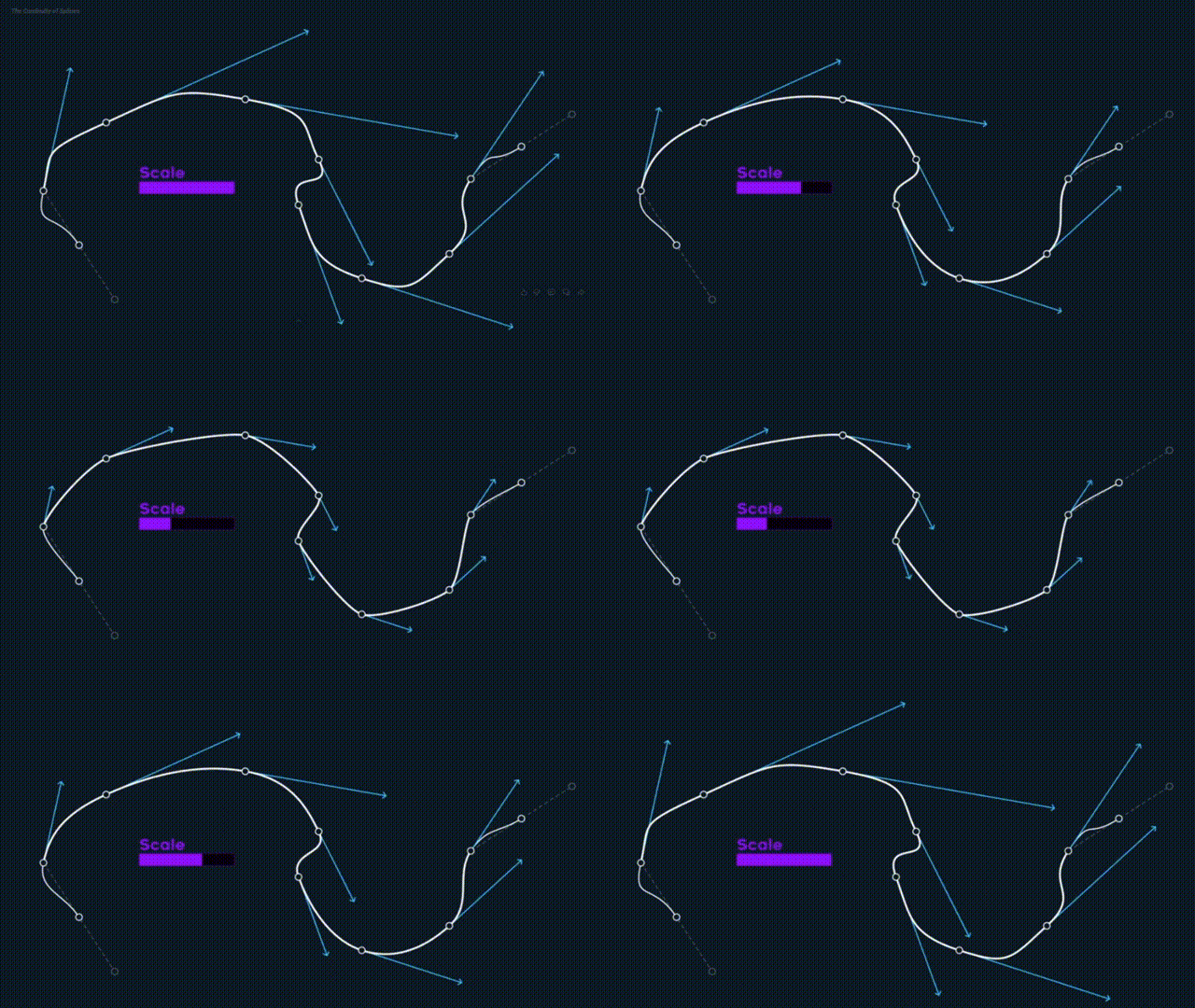
whenThe curve is particularly smooth, so the data pack uses this curve, and its name is Catmull-Rom spline.
Hermite curve
Among them, the recording mode of data pack supports interval sampling and then interpolation, that is, first obtaining the position and speed information of the player at some points, and then passing through these points to generate a smooth curve. The interpolation algorithm is the Hermite curve.
Its shape and speed are shown in the figure below
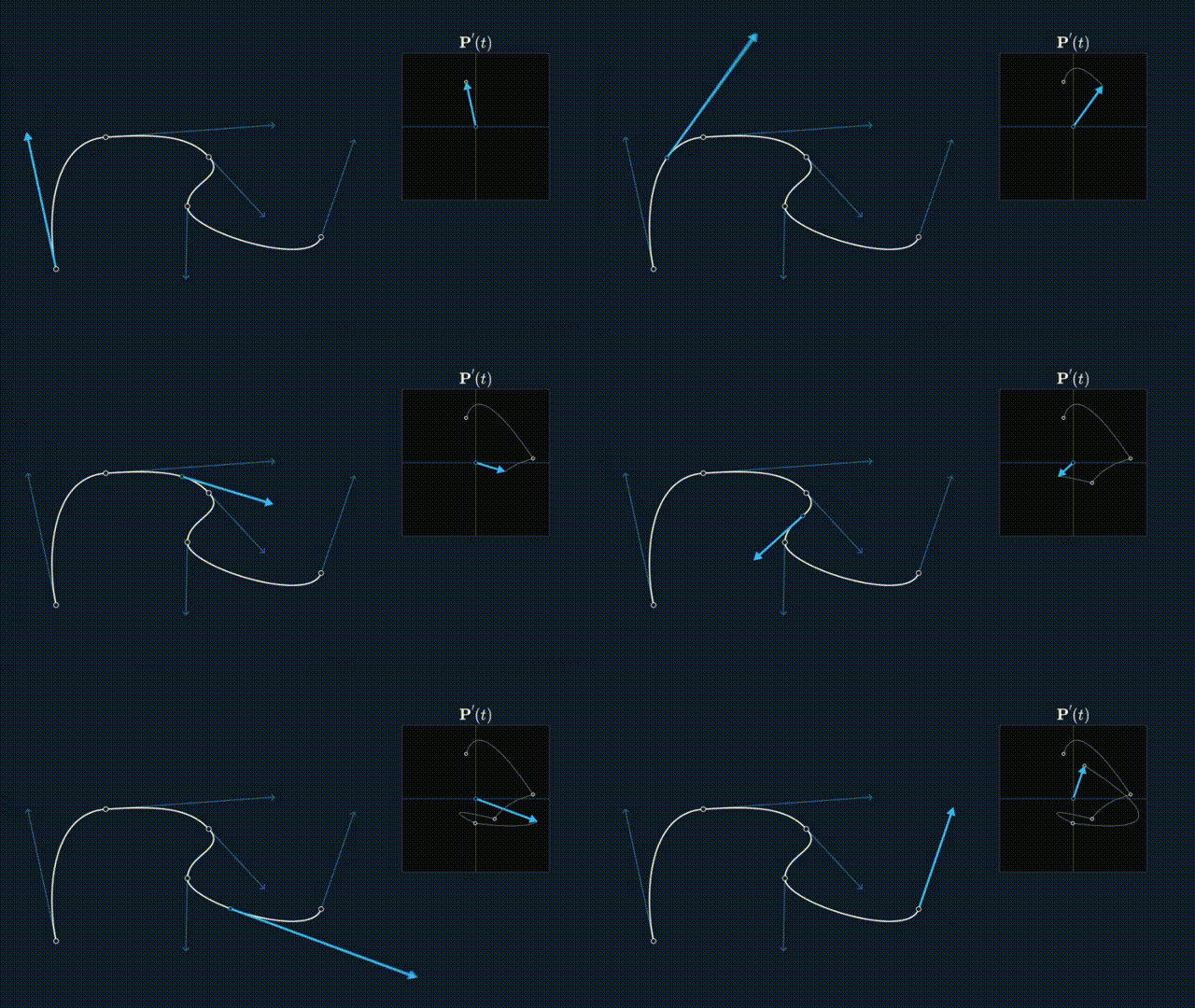
It can be seen that the curve generated by this algorithm is more dynamic and has no second derivative continuity.
**At this point, the derivation of the interpolation curve is over. Thank you for reading this! **
Also hope you have a good review of the camera animation support library
Production credits
special thanks
Qibai——provide ideas
Xu Muxian——provide ideas
Bright stars under the starry sky——Provide optimization
Wenwen EVE——Bug debugging and repair
Creation Tools and Websites
Literature reference
What is interpolation
Easing function
32 easing functions in Bedrock Edition
Introduction to Bezier Curve
Spline interpolation algorithm
Detailed explanation of Bezier curve
Detailed explanation of Catmull-Rom curve 1
Detailed explanation of Catmull-Rom curve 2
Detailed explanation of Hermite curve
Spline function and cubic spline interpolation
MCBE Cameracommand Detailed Explanation
Finally achieved movie-level camera movement! ! How many uses does the camera command have? ?
Complete Storyboarding Tutorial - From Zero Basics to Practical Combat
Those lens principles you should have known
Summary and Outlook
data pack is completely free and open source click here to view updates, password: e0qv.
For cooperation and bug feedback, please go to CoolGaston personal space Chat with the author privately.
Finally, I sincerely hope that this resource library data pack can bring convenience to all developers in their map creation!