
Translation notice
This page was translated with machine translation and may contain inaccuracies. If you can help improve it, please open an issue or submit a pull request.
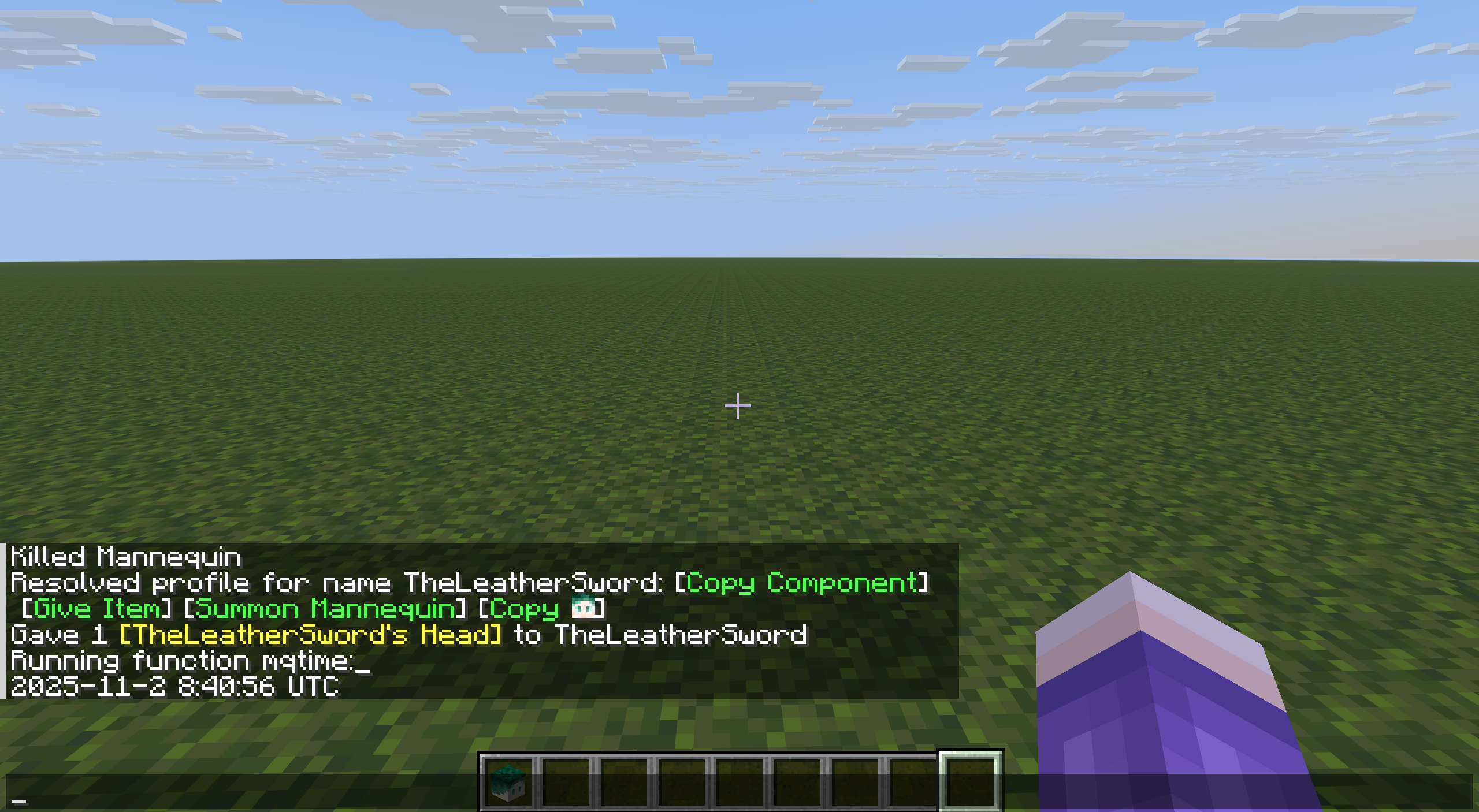
Semi-automatic retrieval of Unix timestamps using head/player profile information
Preface
The book is a continuation of my article in the October issue. giant guy @七白 mentioned one day that he had heard of a "very old" time acquisition solution - using skull data to obtain Unix timestamps.
He mentioned that the player head will request a series of information from the official server, which contains a Unix timestamp accurate to milliseconds. However, the situation is that this timestamp is always included in a base64 string and cannot be directly accessed by command. When mentioning this solution, there is no mention of how the solution is implemented.
But since it’s just base64...it doesn’t seem to be a problem for me?
**Pre-viewing tip: This solution is a semi-automatic solution after 25w34a, which requires the cooperation of a player to proceed normally. **
**At the same time, since this scheme uses scoreboard (int range) to process time data, this scheme will be affected by the 2038 problem. exist2038-01-19 03:14:07 UTCThen read the article and try the implementation at your own risk. **
1. Changes in skull data
Custom player heads were added in Java Edition 12w37a, and since 13w36a/giveThe addition of command enables it to be used in vanilla. For a long time since then, the storage format of the player's head has not changed. Until 24w09a, the structure was basically as follows:
 root tag.
SkullOwner: The player name corresponding to the head. The item will immediately be converted to the following compound item.SkullOwner: The specific information of the player corresponding to the head.
Id: The playerUUID stored as 4 int integers to prevent the player name from changing.Name: Player username, optional. Used to guide the storage of items below. If not, the Steve texture is always used.
Properties: The specific storage location of player texture-related indexes.- One of them (usually only one).
Signature: The electronic signature of the Value item, stored in base64. Optional.Value: The player skin and cloak information obtained from the official server is stored in base64 and contains content in JSON format.
24w09a changed the data related to the player's head and packaged it inminecraft:profileitem component, most of the format changes accordingly. (Actually, it’s mainly a case change.) 24w10a goes further and changes the skull blockentity data into the same format. From then until the current version, the structure is as follows:
profile: The player name corresponding to the head/dummy. The item will immediately be converted to the following compound item.profile: The specific information of the player corresponding to the head/dummy. (Note: The key name of item in item is componentminecraft:profile)id: The playerUUID stored as 4 int integers to prevent the player name from changing.name: player username, optional. Used to guide the storage of items below. If not, the Steve texture is always used.texture: Optional, overrides the skin texture provided below.cape: Optional, overrides the cape texture provided below.model: Optional, overrides the skin format provided below.properties: The specific storage location of player texture related index.- One of them (usually only one).
name: is fixed to the value "textures".signature: The electronic signature of the Value item, stored in base64. Optional.value: The player skin and cloak information obtained from the official server is stored in base64 and contains content in JSON format.
25w34a was the first version of the scheme that had to be downgraded to a semi-automatic implementation. In this version of the head and dummy data, readers will most likely only see the following two situations:
profile: The player name corresponding to the head/dummy. The item will immediately be converted to the following compound item.profile: The specific information of the player corresponding to the head/dummy. (Note: The key name of item in item is componentminecraft:profile)name: player username. If none or empty, the Steve texture is always used.
In fact, in this version, the official has changed the storage logic of the skull player files, and no longer stores relevant data in the skull item/blockentity unless necessary to ensure that it can reflect the player skin changes. At the same time, asynchronous/fetchprofilecommand, this command can only be executed directly by the player, and the complete version (static) can be obtainedprofileComponents, generate skull items or generate dummies.
2. Specific processing of timestamps in skull data
We always only care"(minecraft:)profile".properties[0].value(The previous version wasSkullOwner.Properties[0].Value) location to store the base64 string. It is parsed into a JSON file with the following format:
{
  "timestamp" : 1762015601487,
  "profileId" : "xxxxxxxxxxxxxxxxxxxxxxxxxxxxxxxx",
  "profileName" : "xxxxxxx",
  "signatureRequired" : true,
  "textures" : {
    "SKIN" : {
      "url" : "http://textures.minecraft.net/texture/xxxxxxxxxxxxxxxxxxxxxxxxxxxxxxxxxxxxxxxxxxxxxxxxxxxxxxxxxxxxxxxx"
    },
    "CAPE" : {
      "url" : "http://textures.minecraft.net/texture/xxxxxxxxxxxxxxxxxxxxxxxxxxxxxxxxxxxxxxxxxxxxxxxxxxxxxxxxxxxxxxxx"
    }
  }
}
One very exciting news is that in this JSON file, the timestamp is the first item, and the number of characters before it is determined:{\n "timestamp" : , 18 characters in total. And these 18 characters can be converted to fixed 24-bit base64:ewogICJ0aW1lc3RhbXAiIDog。
Continuing to look, the timestamp is fixed to 13 digits, the first 10 digits are the Unix timestamp, and the last three digits are milliseconds. However, since requests to the official server must have time errors, the processing in this article will discard millisecond information and only process seconds. (Note: Unix timestamps range from September 9, 2001 to November 20, 2286. They are all 10 digits.)
This means that by intercepting the 24th to 40th bits of the base64 string (corresponding to the 12-bit characters of the source string), we can directly locate and extract only what we need from the base64 string.
3. Base64 analysis
The encoding rule of Base64 is: every 3 bytes will be re-divided into four 6-bit binary numbers, corresponding to a Base64 symbol. Since we only take the 16 characters we need and convert them into 12 bytes of data (only 10 bytes will be taken), we can ignore the padding at the end. We can easily complete the digital recognition of these symbols through string slicing and other methods. The specific method will not be described in detail. Readers in need should refer to Section 3.2 of my article in the November issue.
Look directly at the code: functiontm:init/base64(Add tominecraft:loadtag)
scoreboard objectives add base64 dummy
scoreboard players set 64 base64 64
scoreboard players set 256 base64 256
scoreboard players set 10 base64 10
generate functiontm:init/base64_chrThe code is as follows: (Add tominecraft:loadtag)
with open('data/tm/function/init/base64_chr.mcfunction',mode='w',encoding='utf-8') as f:
    f.write('scoreboard objectives add base64_chr dummy')
    for i,ch in enumerate('ABCDEFGHIJKLMNOPQRSTUVWXYZabcdefghijklmnopqrstuvwxyz0123456789+/'):
        f.write(f'\nscoreboard players set #{ch} base64_chr {i}')
f.write('\nscoreboard players set #= base64_chr 0') # 需要处理Base64末尾补位的读者需要这一项。functiontm:base64_decode/_(Fixed handling of 16 characters.)
data modify storage base64: output set value [B;]
function tm:base64_decode/__
function tm:base64_decode/__
function tm:base64_decode/__
function tm:base64_decode/__functiontm:base64_decode/__(Every time 4 characters are read and converted into 3 bytes of data.)
scoreboard players set #temp0 base64 0
function tm:base64_decode/___
function tm:base64_decode/___
function tm:base64_decode/___
function tm:base64_decode/___

scoreboard players operation #temp1 base64 = #temp0 base64
scoreboard players operation #temp1 base64 %= 256 base64
scoreboard players operation #temp0 base64 /= 256 base64
data modify storage base64: output append value 0b
data modify storage base64: output append value 0b
data modify storage base64: output append value 0b
execute store result storage base64: output[-1] byte 1 run scoreboard players get #temp1 base64

scoreboard players operation #temp1 base64 = #temp0 base64
scoreboard players operation #temp1 base64 %= 256 base64
scoreboard players operation #temp0 base64 /= 256 base64
execute store result storage base64: output[-2] byte 1 run scoreboard players get #temp1 base64
execute store result storage base64: output[-3] byte 1 run scoreboard players get #temp0 base64functiontm:base64_decode/___(Read one character.)
data modify storage base64: input.1 set string storage base64: input.0 0 1
data modify storage base64: input.0 set string storage base64: input.0 1
execute store result score #temp1 base64 run function tm:base64_decode/____ with storage base64: input

scoreboard players operation #temp0 base64 *= 64 base64
scoreboard players operation #temp0 base64 += #temp1 base64functiontm:base64_decode/____
$return run scoreboard players get #$(1) base64_chr4. Number combination
Through the above function, we obtain the required 10-digit ASCII code, and subtract 48 from each bit to get the required number. The original Unix timestamp value can be restored through bitwise combination. After completing this step, the value of #temp0 in the scoreboard base64 is the required Unix timestamp value.
functiontm:timestamp_get/_
scoreboard players set #temp0 base64 0
scoreboard players set #i base64 0
execute store result score #temp1 base64 run data get storage base64: output[0]
data remove storage base64: output[0]
execute if score #i base64 matches ..9 run function tm:timestamp_get/__functiontm:timestamp_get/__
scoreboard players operation #temp0 base64 *= 10 base64
scoreboard players operation #temp0 base64 += #temp1 base64
scoreboard players remove #temp0 base64 48
execute store result score #temp1 base64 run data get storage base64: output[0]
data remove storage base64: output[0]
scoreboard players add #i base64 1
execute if score #i base64 matches ..9 run function tm:timestamp_get/__
5. Unix timestamp analysis
Unix timestamp is from1901-01-01 00:00:00 UTCThe starting seconds (note: in most cases there is no need to consider leap seconds when dealing with Unix timestamps and UTC times), so our analysis will start from this time.
functiontm:init/_(Add tominecraft:loadtag)
scoreboard objectives add tm dummy
scoreboard objectives add tm_year dummy
scoreboard objectives add tm_mon dummy
scoreboard objectives add tm_mday dummy
scoreboard objectives add tm_wday dummy
scoreboard objectives add tm_hour dummy
scoreboard objectives add tm_min dummy
scoreboard objectives add tm_sec dummy

scoreboard players set 4 tm 4
scoreboard players set 100 tm 100
scoreboard players set 400 tm 400

scoreboard players set 60 tm 60
scoreboard players set 24 tm 24

scoreboard players set 13 tm 13
scoreboard players set 5 tm 5
scoreboard players set 7 tm 7functiontm:datetime/_
scoreboard players set @s tm_year 1970
scoreboard players set @s tm_mon 01
scoreboard players set @s tm_mday 01
scoreboard players set @s tm_wday 4
scoreboard players set @s tm_hour 00
scoreboard players set @s tm_min 00
scoreboard players set @s tm_sec 00
function tm:datetime/year/_
scoreboard players operation #temp2 tm = #temp1 tm
function tm:datetime/month/_
function tm:datetime/mday/_
tellraw @s {translate:"%s-%s-%s %s:%s:%s UTC",with:[{score:{name:"@s",objective:tm_year}},{score:{name:"@s",objective:tm_mon}},{score:{name:"@s",objective:tm_mday}},{score:{name:"@s",objective:tm_hour}},{score:{name:"@s",objective:tm_min}},{score:{name:"@s",objective:tm_sec}}]}functiontm:datetime/year/_
execute store result score #temp1 tm run function tm:datetime/year/__
execute unless score #temp0 base64 >= #temp1 tm run return 0
scoreboard players operation #temp0 base64 -= #temp1 tm
scoreboard players add @s tm_year 1
function tm:datetime/year/_functiontm:datetime/year/__(Returns the total number of seconds in the current year to #temp1 according to the leap year information.)
scoreboard players operation #temp0 tm = @s tm_year
scoreboard players operation #temp0 tm %= 400 tm
execute if score #temp0 tm matches 0 run return 31622400
scoreboard players operation #temp0 tm %= 100 tm
execute if score #temp0 tm matches 0 run return 31536000
scoreboard players operation #temp0 tm %= 4 tm
execute if score #temp0 tm matches 0 run return 31622400
return 31536000functiontm:datetime/month/_
execute store result score #temp1 tm run function tm:datetime/month/__
execute unless score #temp0 base64 >= #temp1 tm run return 0
scoreboard players operation #temp0 base64 -= #temp1 tm
scoreboard players add @s tm_mon 1
function tm:datetime/month/_functiontm:datetime/month/__(Return the total seconds of the current month to #temp1 according to the leap year information and month number stored in #temp2.)
execute if score @s tm_mon matches 2 if score #temp2 tm matches 31622400 run return 2505600
execute if score @s tm_mon matches 2 run return 2419200
execute if score @s tm_mon matches 4 run return 2592000
execute if score @s tm_mon matches 6 run return 2592000
execute if score @s tm_mon matches 9 run return 2592000
execute if score @s tm_mon matches 11 run return 2592000
return 2678400functiontm:datetime/mday/_
scoreboard players operation @s tm_sec = #temp0 base64
scoreboard players operation @s tm_sec %= 60 tm
scoreboard players operation #temp0 base64 /= 60 tm

scoreboard players operation @s tm_min = #temp0 base64
scoreboard players operation @s tm_min %= 60 tm
scoreboard players operation #temp0 base64 /= 60 tm

scoreboard players operation @s tm_hour = #temp0 base64
scoreboard players operation @s tm_hour %= 24 tm
scoreboard players operation #temp0 base64 /= 24 tm

scoreboard players operation @s tm_mday = #temp0 base64
scoreboard players add @s tm_mday 1
6. (Another) Calculating the day of the week from the date
Weekly calculation is not something that must be completed after obtaining the timestamp, so this section is only used as a reference for readers who need it.
The following formula (Zeller formula) can automatically calculate the week from the date: (where c and d are the first 2 digits and the last 2 digits of the year respectively. When the month is January to February, it is regarded as 13-14 of the previous year.)
w = ( (c // 4) - 2 * c + d + (d // 4) + (13 * (mon + 1) // 5) + day - 1 ) % 7functiontm:datetime/wday/_(Not currently called by other functions.)
scoreboard players operation week_tmp_month tm = @s tm_mon
scoreboard players operation week_tmp_year tm = @s tm_year

execute if score week_tmp_month tm matches 1..2 run scoreboard players remove week_tmp_year tm 1
execute if score week_tmp_month tm matches 1..2 run scoreboard players add week_tmp_month tm 12

scoreboard players operation week_tmp_d tm = week_tmp_year tm
scoreboard players operation week_tmp_d tm %= 100 tm
scoreboard players operation week_tmp_c tm = week_tmp_year tm
scoreboard players operation week_tmp_c tm /= 100 tm

scoreboard players operation @s tm_wday = @s tm_mday

scoreboard players add week_tmp_month tm 1
scoreboard players operation week_tmp_month tm *= 13 tm
scoreboard players operation week_tmp_month tm /= 5 tm
scoreboard players operation @s tm_wday += week_tmp_month tm

scoreboard players operation @s tm_wday += week_tmp_d tm
scoreboard players operation week_tmp_d tm /= 4 tm
scoreboard players operation @s tm_wday += week_tmp_d tm

scoreboard players operation @s tm_wday -= week_tmp_c tm
scoreboard players operation @s tm_wday -= week_tmp_c tm
scoreboard players operation week_tmp_c tm /= 4 tm
scoreboard players operation @s tm_wday += week_tmp_c tm

scoreboard players remove @s tm_wday 1
scoreboard players operation @s tm_wday %= 7 tm
7. Overall operation plan and subsequent maintenance
functiontm:_
data modify storage base64: input.0 set string entity @s Inventory[0].components."minecraft:profile".properties[0].value 24 40
function tm:base64_decode/_
function tm:timestamp_get/_
function tm:datetime/_
Before 25w34a, the above operations could be done directly by/givePlayer head or placing player head block is completed. But the change in 25w34a determines that only player runs/fetchprofileAnd the skull item/fake talent generated using the provided link has complete static file information, and the command system can no longer automatically access the complete file. Therefore, we switched to a semi-automatic approach and used other methods to maintain real-time timers as described in my October article. The steps are as follows:
- Send a time synchronization request to the player with administrator permissions (authority 2 or above), and induce them to click the button containing the following link: (Note: Make the file name as special as possible to avoid the corresponding head in the player's backpack. But be sure to ensure that the player file exists)
execute store result score ... ... run fetchprofile name ...- The player that executes the above command will automatically set the score of a specific scoreboard to 1 and track the scoreboard. If the player executes the command, it will immediately use the command block method to obtain a time. (Note: There is no date information in the time information obtained by the command block method. However, the time is offset according to the time zone of the server, so it will be used for time zone identification.)
- Inducing the player to click the "Give item" or "Generate dummy" button in the message generated in the first step.
- Give item: Use advancement to track the player's backpack. If a new player head is found, the information about the head will be extracted to complete the entire process above. After completion, clear the player head (specifically, clear the head with the same name and properties as the obtained player head) to avoid problems with the next recognition. Generate dummy: Check whether there is a dummy with the corresponding file name at the player's current location, and if so, extract the dummy's file information. Once done, clear the dummy.
- Corresponding time zone: Compare the obtained UTC time with the command block time, and the hour difference is the time zone (but please note that some countries may be more accurate to half an hour time zone). If the UTC time is 13:20:01, and the time obtained by the command block at the same time is 21:20:01, it can be inferred that the time zone is East Eighth District (UTC+8). If there is a second-level difference between the two times, it means there is a request time error. At this time, the number of seconds is based on the command block.
- Maintaining the clock: Obviously sending requests to the official server repeatedly is not good practice, and due to the semi-automatic nature of the process, doing so will also disturb the player. Therefore, please use another method (such as
/stopwatchOr command block method) to continue to complete clock maintenance.
References
https://minecraft.wiki/w/Player_Head
https://minecraft.wiki/w/Player_Head?oldid=2387856
https://minecraft.wiki/w/Mojang_API#Query_player's_skin_and_cape
https://minecraft.wiki/w/Commands/fetchprofile
https://unixtime.org/
https://www.geeksforgeeks.org/dsa/zellers-congruence-find-day-date/
And self-quote from my articles in the October and November issues.