
Translation notice
This page was translated with machine translation and may contain inaccuracies. If you can help improve it, please open an issue or submit a pull request.
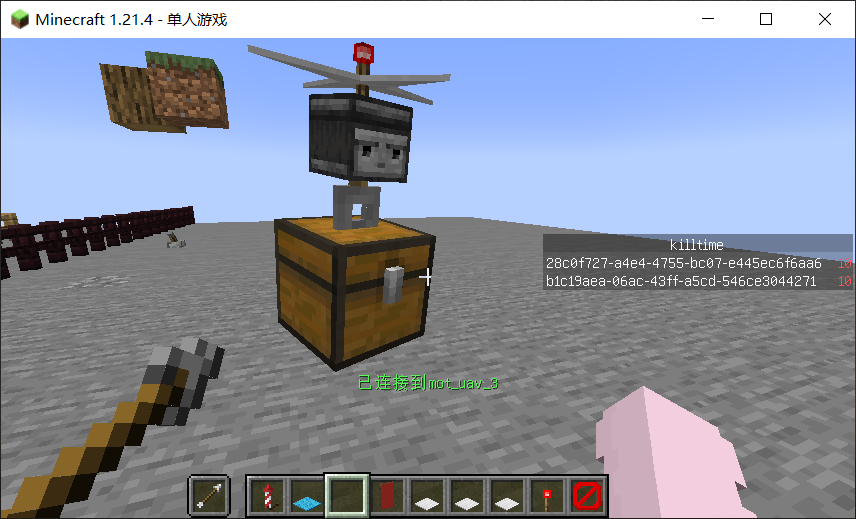


TIP
Applicable version: Minecraft Java Edition 1.21.4 Project architecture: MOT + MOT-Memory + MOT-Math3.1 + MOT-Perf + iframe Language: Minecraft function (mcfunction) + MOT template syntax + linear algebra library Goal: Build a remotely controlled, programmable, and scalable drone system from scratch, and support interaction between external devices and GUI.
Why am I writing this tutorial?
With the rise of related technologies such as item display entity (IDE), text display entity (TDE), and block display entity (BDE) updated in JAVA version 1.19.4, vanilla developers have encountered two urgent practical needs:
- Clear modular management
- High Performance Mathematical Computing
The former is represented by object-oriented technology, which is mainly used to encapsulate multiple display entities into a whole, manually specify object formats and object protocols, and realize communication between modules and objects.
The latter is represented by local coordinate system algorithm, quaternion algorithm, and automatic control algorithm. It is mainly used for the construction of three-dimensional object space models and the calculation of transformation posture to display entities, thereby achieving smooth, flexible, and interactive program animation.
What can you learn in this tutorial?
- The practice of mcfunction object-oriented thinking
- Module protocol and module communication
- Using the mot program for templated project construction
- Standardized testing practices
- Quaternions and local coordinate systems
- Kinematics and Physical Computation
- Application of automatic control algorithms
How to get tutorials?
Warehouse address:https://github.com/xiaodou8593/mot_1.0
source_files is the mcfunction template auxiliary program source file (need to be used in this project)
example_tutorial is the markdown document of the tutorial (please press .mot_example.md、chapter1.md、chapter2.md、chapter3.md read sequentially)
example_datapack is the finished data pack (you can compare it if you encounter any doubts during the project construction process)
1. Project Overview
| Module | Function | Remarks |
|---|---|---|
| mot_uav | UAV body | Kinematics, dynamics, collision, static body optimization, GUI |
| mot_lamp | Redstone lamp | Three slots on the left and right, the switch status is synchronized |
| mot_scatter | Six-barreled machine gun | Continuous bullets + scattering angle + sound effects |
| mot_laser | Laser gun | Cooling mechanism + penetrating damage |
| mot_mover | block mover | read/place block+NBT save |
| mot_dropper | Bomb dropper | Only TNT allowed, automatic fuze |
| mot_boat | Tethered boat | Create leash with drone, support towing |
| mot_scenes | Exhibition scenes | State machine arrangement, one-click demonstration of all equipment |
2. Technical Highlights
| Category | Implementation | Description |
|---|---|---|
| Kinematics | Quaternion + local coordinate system | 10000 fixed point decimal, angular velocity/linear velocity iteration |
| Dynamics | Impulse-response system | Supports multiple collision points, normal vectors, and elastic coefficients |
| Static entity optimization | Freeze static entity | Save computing power, flame graph verification |
| Device Protocol | _sync_request / _sync_coord / _use_signal | Three-slot plug-and-play |
| GUI | iframe backpack replacement | Gaze tracking + permission item + button event |
| Control program | State machine + combination program | Height/rotation/displacement/aim/wait/connect/disconnect |
| Bullet module | Sub-entity recursion | Particles + damage + penetration block |
| Number pool | Module levelfree_addr | Avoid int upper limit and support dynamic registration/unregistration |
| Performance | perf pipeline integration | if_blockOnly 4~5 scoreboard overhead |
3. Drone control program list
| Program | Function | Status |
|---|---|---|
height | Fixed height hover | 0/1/2 |
rotation | Yaw angle lock | 0/1/2 |
position | Horizontal displacement | 0/1/2 |
facing | Aim at target point | 0/1/2 |
compose | Multi-program serial | 0/1/2 |
up / turn / forward | Instant increment | Transfer to the above program |
left_connect / left_deconnect / left_use | Left Slot | 0/-1/2 |
down_* / right_* | The other two slots | Same as above |
waiting | Wait N moments | Countdown |
landing / near_landing | Near ground landing | Automatic altitude correction |
4. External device slot coordinate
| slot | local coordinate (u,v,w) | description |
|---|---|---|
| left | (2500,0,0) | 0.25 blocks to the left of the drone |
| down | (0,-2500,0) | 0.25 blocks below the drone |
| right | (-2500,0,0) | 0.25 blocks to the right of the drone |
The device only needs to implement
_sync_request / _sync_coord / _use_signalcan be automatically recognized.
5. Generate device instance
Generate drone
# 导入数据模板
data modify storage mot_uav:io input set from storage mot_uav:class test
# 指定生成位置
tp @e[tag=math_marker,limit=1] 0 0 0
data modify storage mot_uav:io input.position set from entity @e[tag=math_marker,limit=1] Pos
# 解析数据模板,构造实例
function mot_uav:_new
spawn machine gun
# 导入数据模板
data modify storage mot_scatter:io input set from storage mot_scatter:class test
# 指定生成位置
tp @e[tag=math_marker,limit=1] 0 0 0
data modify storage mot_scatter:io input.position set from entity @e[tag=math_marker,limit=1] Pos
# 解析数据模板,构造实例
function mot_scatter:_new
The method of constructing other device instances is the same as above
Common test scenarios
function mot_uav:test/general/startTarget test scenarios
function mot_uav:test/facing/startOne-click exhibition scene
function mot_scenes:exhibition/start