
Translation notice
This page was translated with machine translation and may contain inaccuracies. If you can help improve it, please open an issue or submit a pull request.
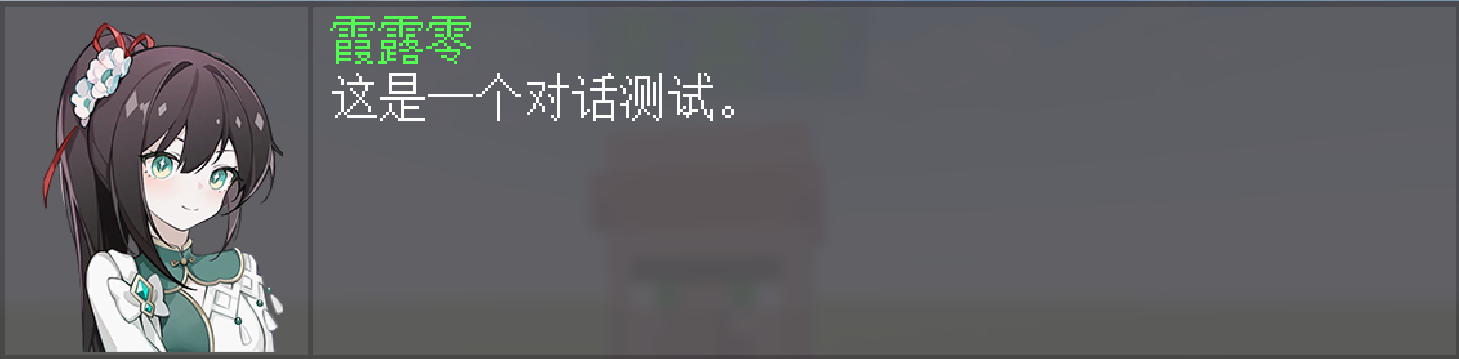


is based on /dialog You can also call it galgame style dialog ()
How to use
You can customize a dialog with any vertical drawing, any name, any content and any options according to the template
1. Create a dialogue object
First of all, this dialog is triggered by right-clicking on the interactive entity. So you just need to generate a file with "dialog"tag's interactive entity and edit the following content:
dialog_path: The dialogue content pointed to by function
can be modified arbitrarily. The example NPC is as follows:
summon villager ~ ~ ~ \
{\
    CustomName:{"translate":"npc"},\
    Passengers:[\
        {id:"interaction",Tags:["dialog"],height:-0.7,width:1,response:1b,\
            data:{\
            \
                dialog_path:"icu:npcs/test/main"\
            \
            }\
        },\
        {id:"text_display",transformation:{scale:[1f,1f,1f],translation:[0f,0.2f,0f],right_rotation:[0f,0f,0f,1f],left_rotation:[0f,0f,0f,1f]},alignment:center,billboard:center,\
            \
            text:{"translate":"npc"}\
            \
        }\
    ]\
}
Sample NPCs are also written in
data pack, which can be accessed through/function icu:npcs/testTo generate
2. Edit the basic dialogue function
After generating the dialogue object, we need to edit our own dialogue content
You need to edit a function in the following format and fill in the function path into the dialog_path in the previous step (the path is /function callable function path)
#设置名字		必填项
data modify storage icu:dialog dialog.name set value "name"

#设置立绘		必填项
data modify storage icu:dialog dialog.char set value "lihui"

#设置对话内容		必填项   不超过23x5=115个汉字
data modify storage icu:dialog dialog.dialog set value "content"

#设置选项名称		选填项 不需要的话设置为空字符串即可
data modify storage icu:dialog dialog.choose1 set value ""
data modify storage icu:dialog dialog.choose2 set value ""
data modify storage icu:dialog dialog.choose3 set value ""
data modify storage icu:dialog dialog.choose4 set value ""

#音效			必填项 内容为一个完整的/playsound指令
data modify storage icu:dialog dialog.sound set value "playsound entity.experience_orb.pickup ambient @s ~ ~ ~ 5 1.5"

#调用函数		不用管
function icu:dialog/main

#禁止点击“上一步”按钮	选填项 若不想或无法让玩家返回到上一段对话,给予以下tag即可
tag @s add dialog_not_up

#禁止点击“下一步”按钮	选填项 若不想或无法让玩家跑到下一段对话,给予以下tag即可
tag @s add dialog_not_down
You can also unpack it yourself to view the examples I stuffed in the data pack (path:data/icu/function/npcs/test/1)
3. Set the upper and lower dialogue function
The serial number of the dialogue is determined by the player's "dialog_phase"Scoreboard decides
dialog_not_upThe scoreboard is initially 1 point
When the "Previous" button is clickeddialog_phaseThe scoreboard decreases by one when the "Next" button is clicked.dialog_phaseAdd one to the scoreboard (Note: If the current dialogue has not finished playing, clicking "Next" will give priority to playing the current dialogue directly instead of givingdialog_phaseScoreboard plus one)
If you don’t want this conversation to jump to the previous or next conversation, you can add the "dialog_not_up"and"dialog_not_down” tag
According to the above format, you can write function
according to your own preferences. Note: When you need to apply the method in this chapter for multiple dialogue contents, you need todialog_pathThe pointed function is changed to judgmentdialog_phaseThe function of the scoreboard score is called the main function
Example:
execute if score @s dialog_phase matches 1 run return run function icu:npcs/test/1

execute if score @s dialog_phase matches 2 run return run function icu:npcs/test/2
You can also unpack it yourself to view the examples I stuffed in the data pack (path:data/icu/function/npcs/test/main)
4. Set options
options can be set up to 4 (to create options, you only need to fill in the option name into the corresponding string in the function edited in step 2) The scoreboard of the
option isdialog_choose_triggerThe 1st to 4th options will set this scoreboard to 1 to 4 points respectively
at the same time.dialog_choose_triggerAfter the score, the data pack will automatically detect and jump to the function edited in the third step, and then passdialog_phaseThe scoreboard again points to the dialogue function of the corresponding stage (that is, the dialogue stage for which the option currently exists)
Therefore, you need to detect in the function of the corresponding dialogue stagedialog_choose_triggerWhether the score on the scoreboard is between 1 and 4, terminate this function and jump to the dialogue content of the corresponding option
You need to change it manually after the jumpdialog_phaseScoreboard score
For example, if you start fromdialog_phase=2Jumped to the dialogue function of "choose1", you can change it todialog_phase=100
and then click "Next",dialog_phasewill become 101 points, and the correspondingdialog_phase=101Dialog function
Example:
function
for the dialog phase where options currently exist
#如果有选项
execute if score @s dialog_choose matches 1 run return run function icu:npcs/test/choose1
execute if score @s dialog_choose matches 2 run return run function icu:npcs/test/choose2

#设置名字
data modify storage icu:dialog dialog.name set value "§a霞露零"

#设置立绘
data modify storage icu:dialog dialog.char set value "xll"

#设置对话内容   不超过23x5=115个汉字
data modify storage icu:dialog dialog.dialog set value "§f我是§a霞露零§f。"

#设置选项
data modify storage icu:dialog dialog.choose1 set value "这是什么"
data modify storage icu:dialog dialog.choose2 set value "没事了"
data modify storage icu:dialog dialog.choose3 set value ""
data modify storage icu:dialog dialog.choose4 set value ""

#音效
data modify storage icu:dialog dialog.sound set value "playsound entity.experience_orb.pickup ambient @s ~ ~ ~ 5 1.5"

function icu:dialog/main

#禁止下一步
tag @s add dialog_not_down
choose1 option dialogue function
in the above function
#设置名字
data modify storage icu:dialog dialog.name set value "§a霞露零"

#设置立绘
data modify storage icu:dialog dialog.char set value "xll"

#设置对话内容   不超过23x5=115个汉字
data modify storage icu:dialog dialog.dialog set value "§f这是一个对话测试。"

#设置选项
data modify storage icu:dialog dialog.choose1 set value ""
data modify storage icu:dialog dialog.choose2 set value ""
data modify storage icu:dialog dialog.choose3 set value ""
data modify storage icu:dialog dialog.choose4 set value ""

#音效
data modify storage icu:dialog dialog.sound set value "playsound entity.experience_orb.pickup ambient @s ~ ~ ~ 5 1.5"

function icu:dialog/main

scoreboard players set @s dialog_phase 100

#禁止上一步
tag @s add dialog_not_up
The main function of the third step anddialog_phase=101The function
pointed to
execute if score @s dialog_phase matches 1 run return run function icu:npcs/test/1
execute if score @s dialog_phase matches 2 run return run function icu:npcs/test/2

execute if score @s dialog_phase matches 101 run return run function icu:npcs/test/3#如果有选项
execute if score @s dialog_choose matches 1 run return run function icu:npcs/test/choose1
execute if score @s dialog_choose matches 2 run return run function icu:npcs/test/choose2
#设置名字
data modify storage icu:dialog dialog.name set value "§a霞露零"
#设置立绘
data modify storage icu:dialog dialog.char set value "xll"
#设置对话内容 不超过23x5=115个汉字
data modify storage icu:dialog dialog.dialog set value "§f还有什么事吗?"
#设置选项
data modify storage icu:dialog dialog.choose1 set value "这是什么"
data modify storage icu:dialog dialog.choose2 set value "没事了"
data modify storage icu:dialog dialog.choose3 set value ""
data modify storage icu:dialog dialog.choose4 set value ""
#音效
data modify storage icu:dialog dialog.sound set value "playsound entity.experience_orb.pickup ambient @s ~ ~ ~ 5 1.5"
function icu:dialog/main
#禁止上一步
tag @s add dialog_not_upVertical drawing related
Vertical drawing related issues
Since the dialogue function is made by modifying the font picture, the vertical drawing picture needs to be saved according to 231x256 pixels If your picture meets the 231 pixel width However, there are no pixels in the leftmost and rightmost columns. You can click a black dot with 1% transparency in the leftmost and rightmost blank spaces, so that these two black dots will not be displayed in the game, and the image width must also meet 231 pixels and need to be in resource The json file corresponding to the font you write in the pack
Usage
Create the json part
Please use any json file in the "\dialogresource pack\assets\photo\font\dialog\char" folder as an example and create a json file in the current folder where: file: The path pointing to the corresponding picture vertical drawing height: Height scaling of the image. After setting the image to 231x256 pixels, this item can only be 110 ascent: The vertical offset value of the image, >0 means upward offset, <0 means downward offset wiki details: <https://zh.minecraft.wiki/w/自定义字体#bitmap>
Application part
In the text component, point "font" to the custom font json file created above For example: {"font":"photo:dialog/char/你的json文件名",text:" "} If you create json according to the example I gave, that is, the "chars" list contains "\u0020", the spaces in the text cannot be omitted and there can only be one space
End
data pack and resource pack download
better dialogdata packresource pack.zip
Since it was written in a hurry and done in a hurry, the performance may be poor, and the tutorial will not be too detailed, please forgive me