
Translation notice
This page was translated with machine translation and may contain inaccuracies. If you can help improve it, please open an issue or submit a pull request.
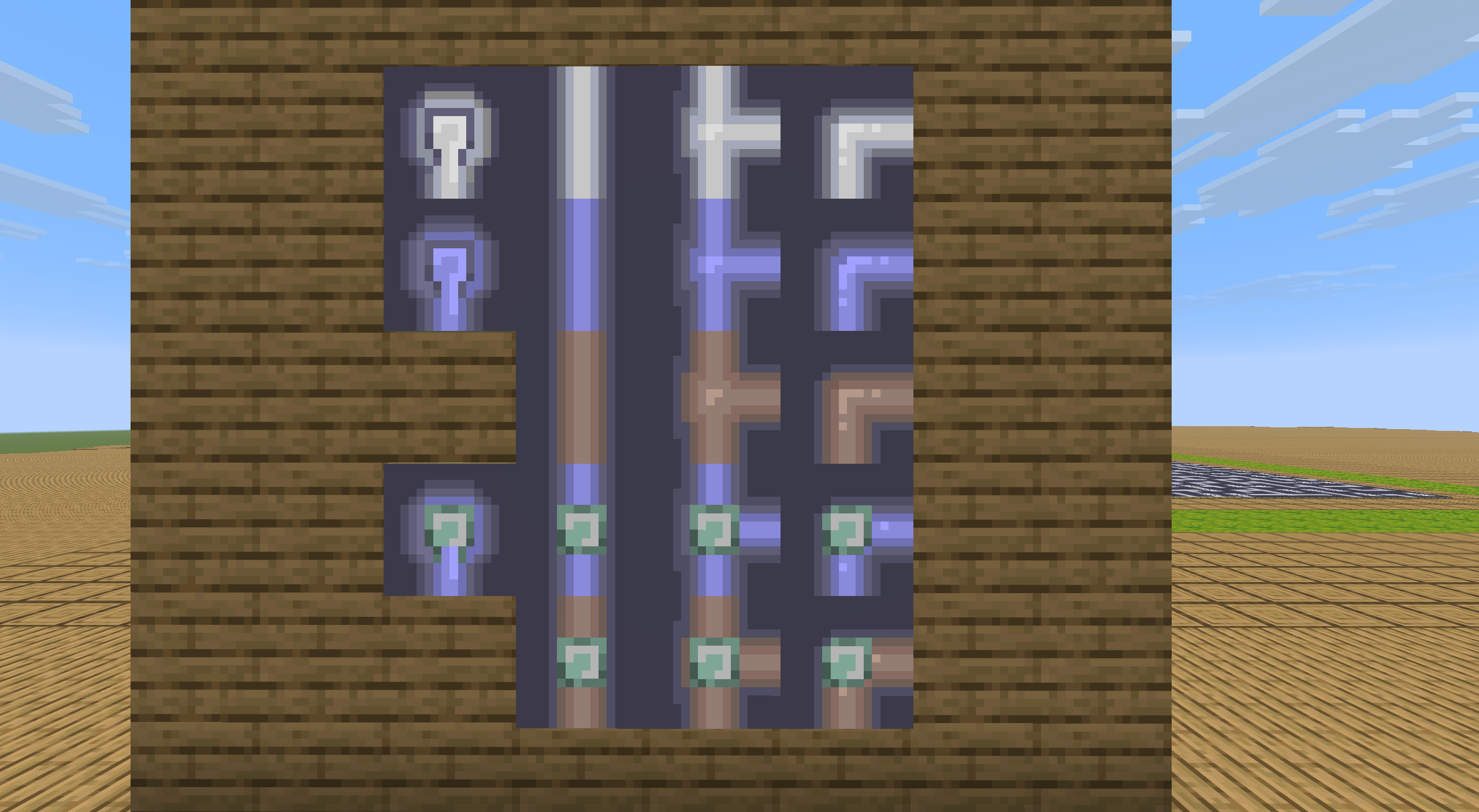


Implementation of water pipe map generation and verification (entity solution)
Author's Note
This article provides another solution for generating and testing the water pipe game map based on Prim and DFS algorithms. The book follows the [joint draft] of this month's issue by Hong Seyu and Xu Muxian (/feature/archive/202606/0/content.md) (hereinafter referred to as the first part). The original Prim implementation ideas provided by Hong Seyu are quite different from mine, but after modifications by Xu Muxian, the algorithms of the two sides are almost the same. Therefore, this article will not reintroduce the problem and algorithm. Readers in need are please read the previous article.
In order to facilitate readers' correspondence, the chapter numbers of this article will also be aligned with the previous part, which can be regarded as some kind of expansion of the previous part.
The entity-based solution may be slightly worse than the data-based solution in terms of generation and processing (because it requires a lot of interaction with blocks and entities, but in fact it is not much worse, and the 30x30 range can be generated in 250~300ms). But the advantage is that the structure is clear and concise, almost completely corresponding to the text description of the algorithm. There is no need to use macros repeatedly, making it easy for beginners to quickly create and understand.
At the same time, the entityization solution also facilitates the generation of more content under the same command chain length. The scheme used in this article can generate a maximum map of 33x33 under the default command chain length (including disruption and initial inspection coloring).
2. Ideas and processes
2.2b Implementation of DFS inspection in the entityization solution
Since all data in the entityization solution runs in an actual block area, the DFS process does not involve establishing an actual stack or calling another entity. In this solution, DFS is completed directly using the function stack. All participating entities are map display frames, and no artificial stack is created. Therefore, unlike the previous article, this solution cannot perform active backtracking and can only rely on the backtracking work of the function stack itself.
This solution uses the following node types:
dry: The node has not been visited, and the corresponding block is Watermelon.wet: The node has been filled with water, and the corresponding block is a pumpkin lantern (which also plays the role ofparentThe function of the sign, which points to its direct water source in a non-loop, will be used later. )source: This node is the water source, and the corresponding block is the bacterial light body. (Shared tag with Jack-O-Lanternpipes:wet。)
visiting: The path DFS is currently taking, the corresponding block is a yellow frog light.ochre_froglight。conflict_n: The number of times a location conflicts, that is, the number of attempts to access the location after having already passed the location once. This item is not recorded as a block but in the display box entity.pipes_conflictIn the scoreboard, that is, it can exist simultaneously with the previous items.ring_n: The node is innon a ring. Same as above, recorded in the display box entitypipes_ringon the scoreboard.
It can be noted that compared with the previous part, this solution adds the "ongoing path" status in the DFS process. This directly prevents the loop type 1 in Figure 5 of the previous article from appearing (you can think about why), and the conflict will only be caused by "walking to the place where you have already walked again". Therefore, we use counting to process loop annotations during passive backtracking.
We provide the following examples to fully illustrate how such a scheme might be developed. In these examples, the originalring(equivalent to the currentring_1) status is displayed with a green frog light. The originalconflict(equivalent to the currentconflict_1) status is displayed with a purple frog light, but these two are different fromvisitingStates are actually independent of each other.
2.2b.1 Start with a ring
Assume that during the DFS process, one of the branches goes to a place that has already been traveled, forming a loop. To simplify it a bit, the whole picture is oneqshape. How to mark the ring?
We can find that if we encounter an area that we have already walked through, we will mark it asconflictstate, the areas inside and outside the ring are separated by this.
The recursive backtracking process of DFS is the opposite of the search path, so when backtracking,conflictThe place passed before the state is a loop, and the place passed after encountering it (that is, the area traveled before the loop was searched) is not part of the loop.
Since the entityization solution is not recorded like the previous part,parentchain (at least the global DFS part does not use this part of the data), we cannot use active backtracking for status annotation. However, the better thing about the entity solution is that it can easily select the entire image. Therefore, our plan is as follows:
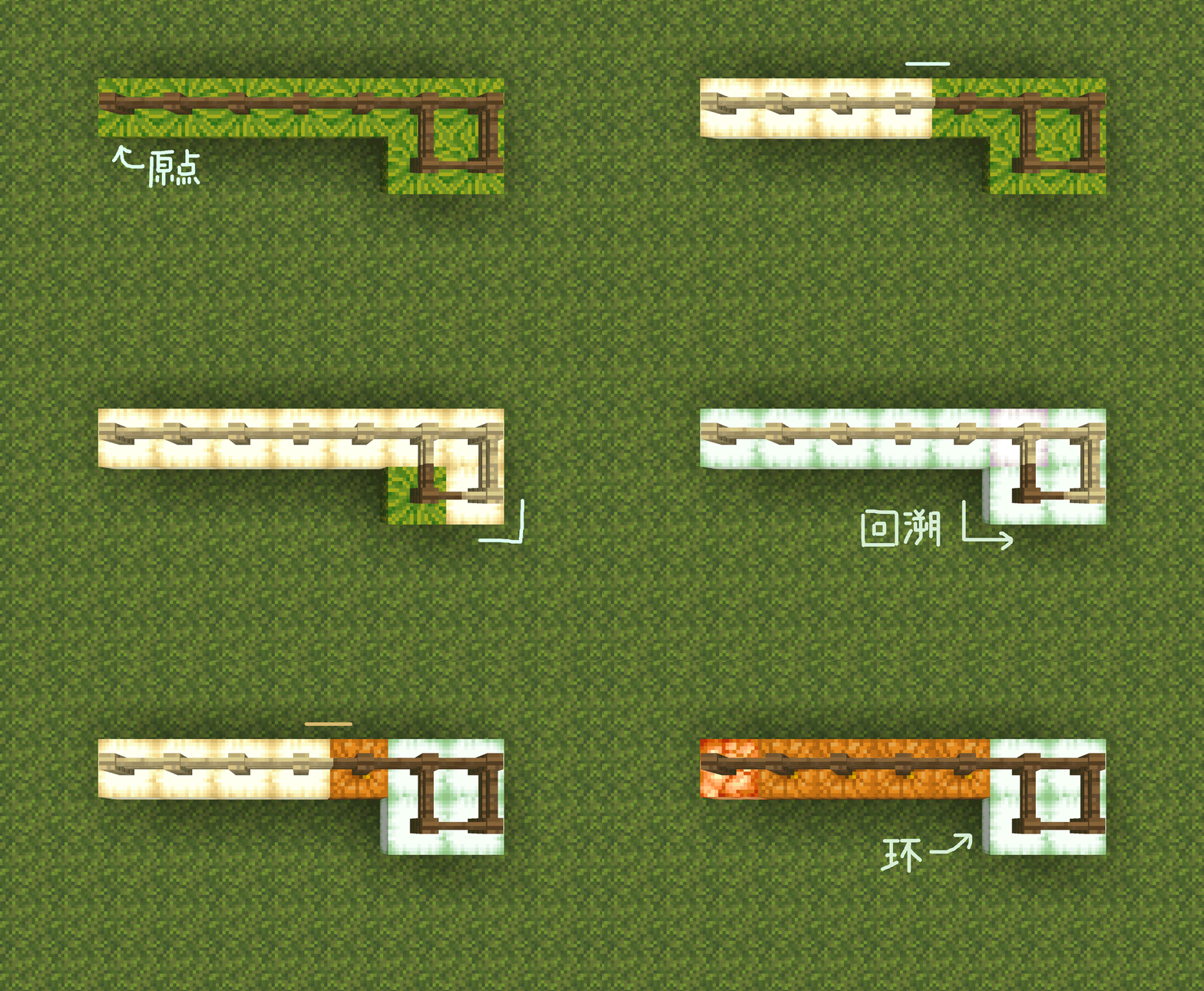
At every step of DFS:
- If the point is at
ringstatus, it is returned. (Otherwise, a loop will be traveled twice, and the cost is exponential when there are multiple loops on the same road.) - If the point is already at
visitingstate:- to all in
visitingState point (if it is a non-entity solution, active backtracking is required here) Addringstatus, becomesvisiting_ringstate. - Add to this point
conflictstatus, becomesvisiting_conflict_ringstate. - return.
- to all in
- Search in all non-source directions.
- When backtracking, if the point has
conflictstate:- to all at the same time
visiting_ringstatus point (excluding itself), clear itringstate.
- to all at the same time
In this way, we can mark the rings on the picture. The pseudocode is as follows:
function dfs(now_tile,from_direction)
    if now_tile.RING do
        return
    if now_tile.state == VISITING do
        for tile in visiting_list do
            tile.RING = True
        now_tile.CONFLICT = True
        return

    now_tile.state = VISITING
    for direction in directions if has_edge(now_tile,direction) and not direction == from_direction do
        neighbor_tile = now_tile.neighbor(direction)
        if neighbor_tile.state == DRY do
            dfs(neighbor_tile,direction)

    now_tile.state = WET
    if now_tile.CONFLICT do
        for tile in visiting_list if tile.RING do
            tile.RING = False
        now_tile.CONFLICT = False
2.2b.2 Multiple Ring Solution
However, this solution quickly became buggy.
In the picture below there are two rings in a row. The DFS process that was supposed to backtrack and complete the ring marking after finding the ring on the left left the range of the ring and searched for a new ring (right side) after marking but before backtracking. Therefore, the tags in the left ring are cleared as out-of-ring areas after the DFS process backtracks from the right ring.
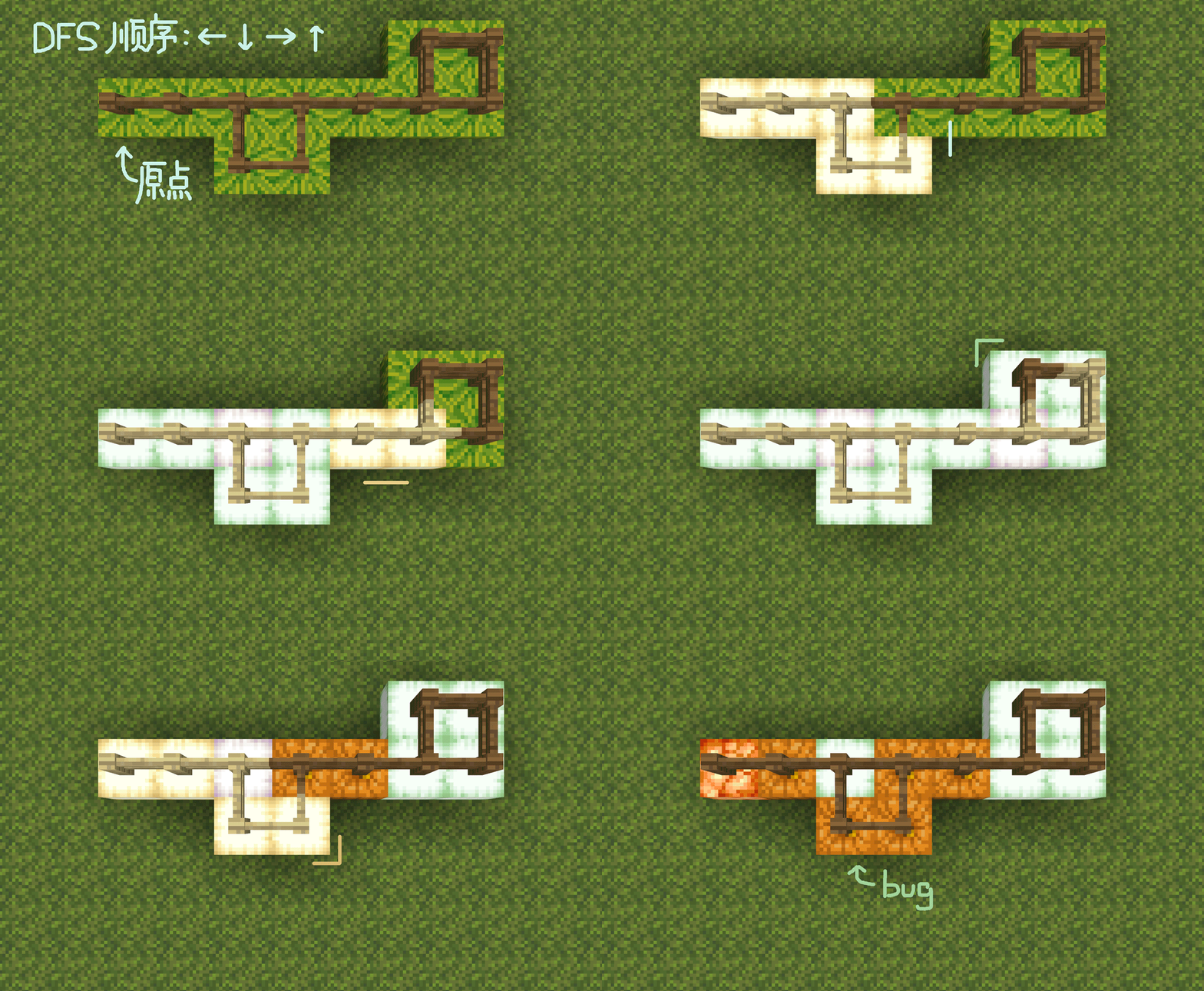
The solution is simple too. Since "covering" will cause conflicts, change "covering" to "overlay". Specifically, putringThe status is changed to a numerical value. If a conflict is encountered, all nodes being visited willringAdd 1 to the value and subtract 1 if there is a backtracking conflict. The pseudocode is as follows:
function dfs(now_tile,from_direction)
    if now_tile.RING >= 1 do
        return
    if now_tile.state == VISITING do
        for tile in visiting_list do
            tile.RING += 1
        now_tile.CONFLICT = True
        return

    now_tile.state = VISITING
    for direction in directions if has_edge(now_tile,direction) and not direction == from_direction do
        neighbor_tile = now_tile.neighbor(direction)
        if neighbor_tile.state == DRY do
            dfs(neighbor_tile,direction)

    now_tile.state = WET
    if now_tile.CONFLICT do
        for tile in visiting_list if tile.RING >= 1 do
            tile.RING -= 1
        now_tile.CONFLICT = False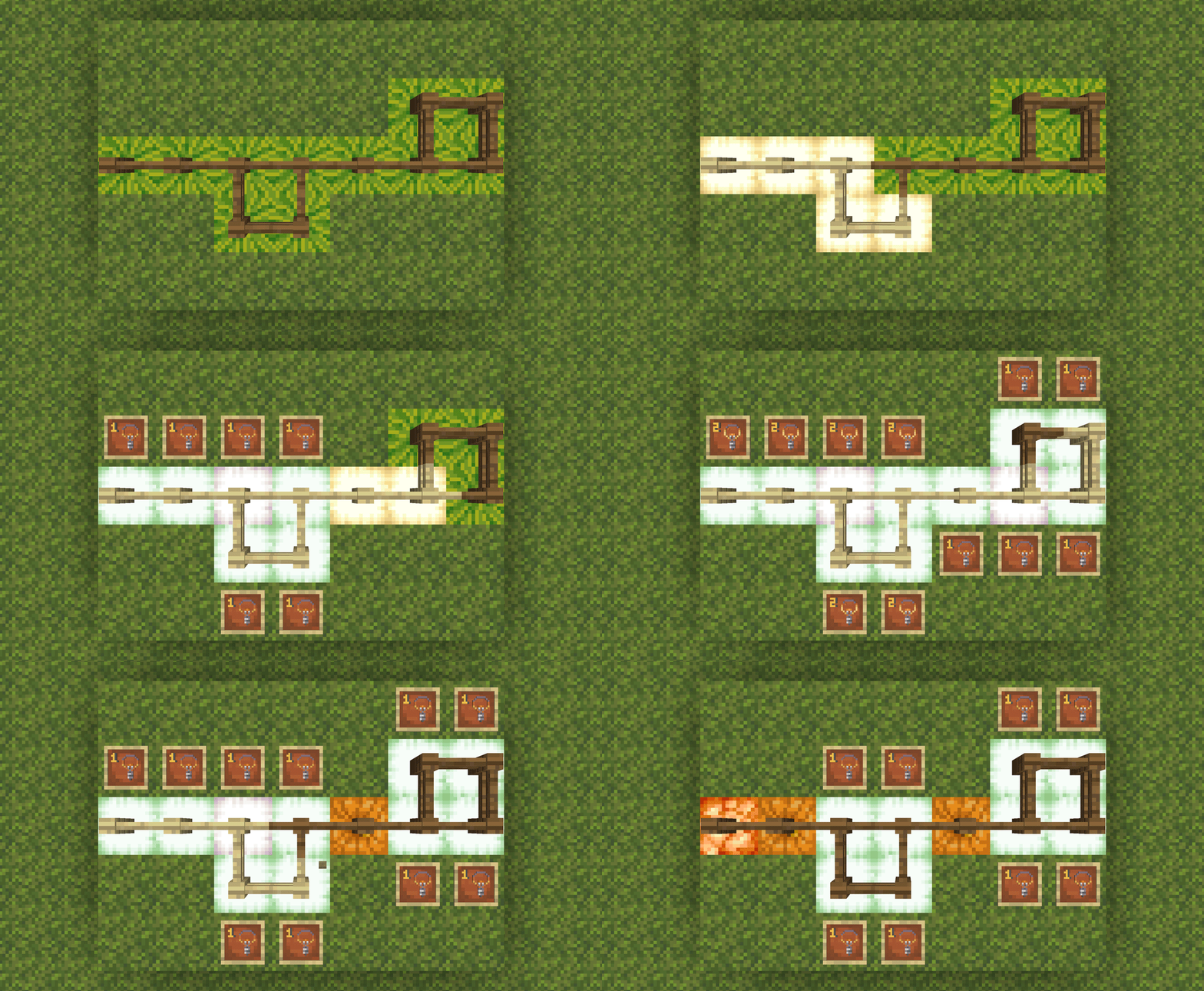
Of course, at this point, the algorithm still has problems.
The two rings in the picture below (actually three rings in a sense) will conflict at the same position, that is, the "conflicts" also cover each other. This coverage will cause the DFS process to leave the ring in the area outside the ring.ringThe value still does not return to 0, resulting in a line from the starting point to the ring being also marked as part of the ring.
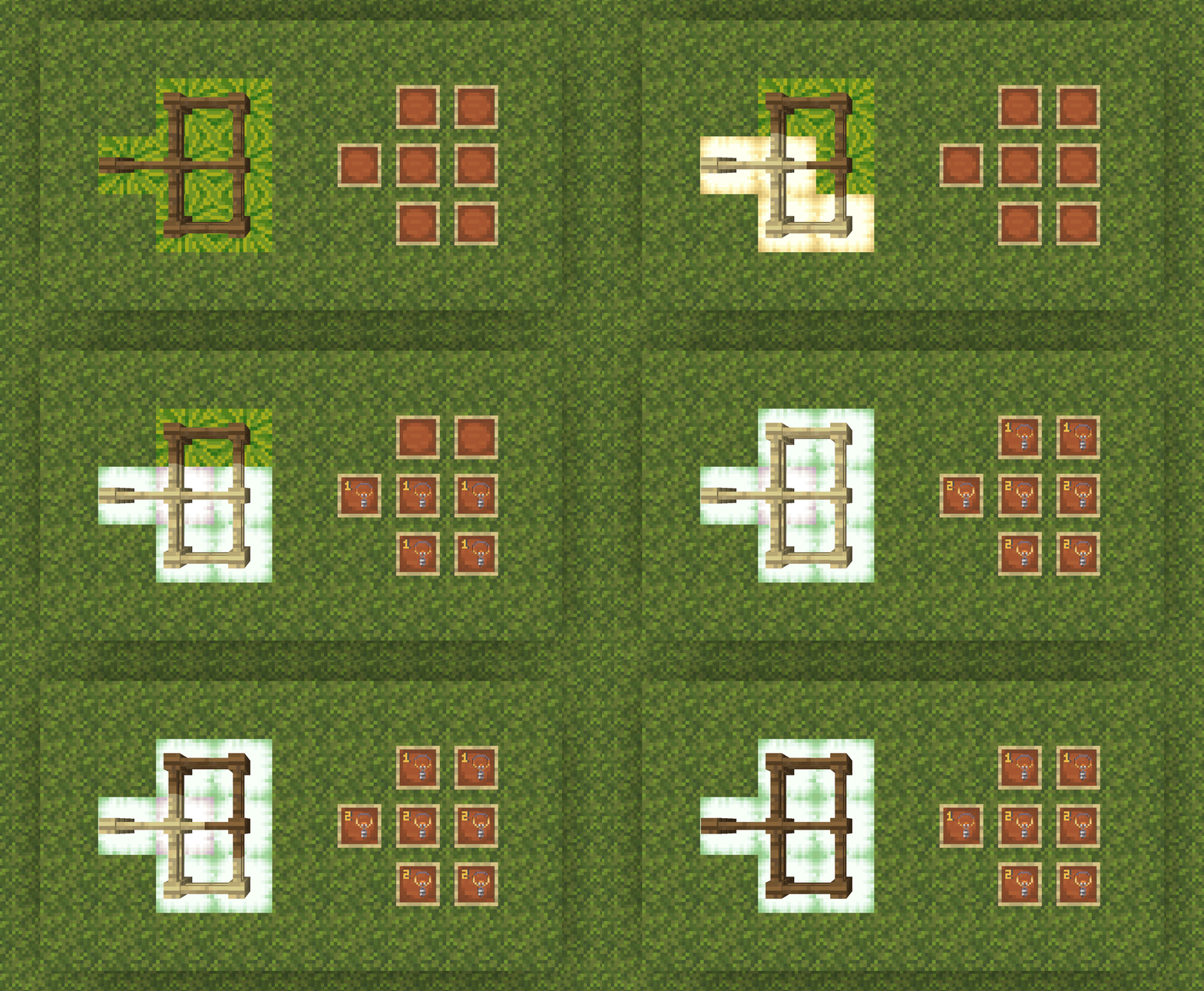
But since we know that they cover each other, the solution is also obvious, which is to putconflictThe status is also changed to numerical record. The final pseudocode is as follows.
function dfs(now_tile,from_direction)
    if now_tile.RING >= 1 do
        return
    if now_tile.state == VISITING do
        for tile in visiting_list do
            tile.RING += 1
        now_tile.CONFLICT += 1
        return

    now_tile.state = VISITING
    for direction in directions if has_edge(now_tile,direction) and not direction == from_direction do
        neighbor_tile = now_tile.neighbor(direction)
        if neighbor_tile.state == DRY do
            dfs(neighbor_tile,direction)

    now_tile.state = WET
    if now_tile.CONFLICT >= 1 do
        for tile in visiting_list if tile.RING >= 1 do
            tile.RING -= now_tile.CONFLICT
        now_tile.CONFLICT = 0
This forms the final algorithm for this part.
2.4 Partial inspection
The test in the previous article is to clear all the markers on the map and re-run a complete DFS every time you click, which is actually quite a waste of performance for larger maps.
Considering that each click actually only changes the state of one grid, we can actually update only the map area that the grid changes with each click.
Unless directly interacting with a ring, the irrigation status of multiple directions connected by a grid is always independent of each other. We can divide a grid's update of the map into two categories: irrigation and drying.
These two types of changes are still completed by DFS, and the watering part completely shares the code with the full-map DFS (that is, the full-map update is equivalent to resetting all grids to a dry state and then starting watering from the water source); The drying part is also very short, and only the filling part needs to be slightly modified. The pseudo code is as follows.
function dfs_dry(now_tile,from_direction)
    if now_tile.state == VISITING do
        return

    now_tile.state = VISITING
    for direction in directions if not direction == from_direction do
        neighbor_tile = now_tile.neighbor(direction)
        if connected(now_tile,neighbor_tile) and neighbor_tile.state == WET do
            dfs(neighbor_tile,direction)

    now_tile.state = DRY
    now_tile.RING = 0
So, the key is how we determine what modifications to make.
If a grid was originallydrystatus, then you only need to check whether there is any lattice successfully connected to after modification.wetstatus. If so, just perform watering at the current location. But if a grid was originallywetstatus, things are not easy to handle, because it is difficult for us to judge whether the grid will become dry only through the static information of the grid itself (even if the dependency relationship has been stored).
As for why, take a look at the example below.
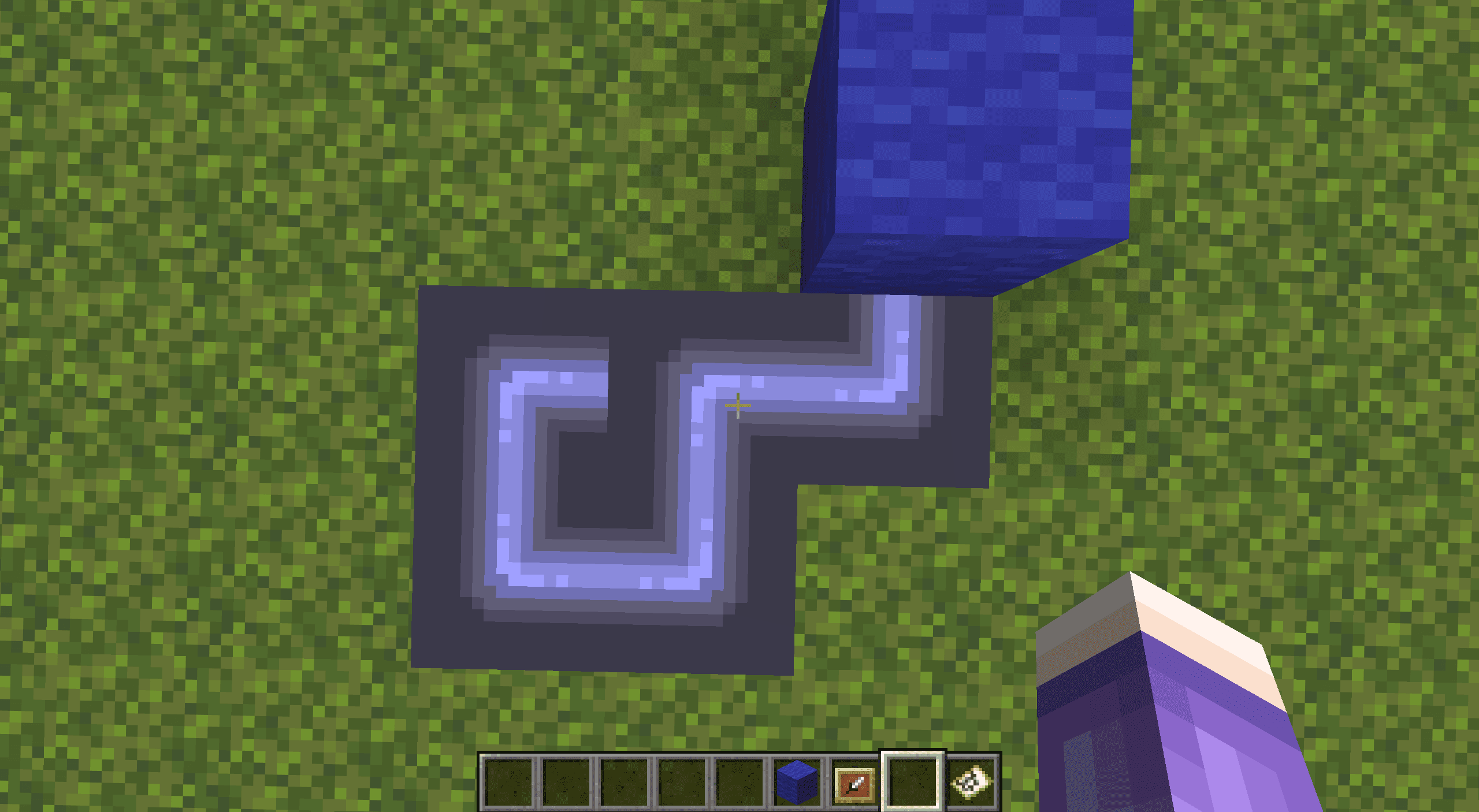
Pay attention to the cell pointed by the pointer. Clicking on this cell will change it to connect the left and bottom.
Assuming that we can only obtain information about the grid and its surrounding 4 grid neighbors (including its dependency relationships), intuitively we may come up with this solution: check whether the connected neighbors around the grid havewetThe status and attached water source are not the grid itself. If there is, it will continue to have water.
Unfortunately, this solution in this case would result in the loop still self-irrigating without drying out after being disconnected from the grid. Because of the possibility of loops (although no grid should be marked as being on a loop before or after the change in this example), grids that are not directly attached to the grid may still depend on the grid through another path. And if you consider looking for dependencies, then this is no longer a decision using only static information.
Therefore, this solution is handled as follows:
- If a grid is
wetstatus, update it dry first (as per the connection before rotation). - In this way, the grid is transformed into
drystatus, you can use the previous function to perform water updates.
This is not necessarily the most efficient solution, but it is certainly simpler.
2.4.1 Choice of partial inspections
The previous part of the inspection process actually did not consider loops at all. If the operated lattice is on the loop (the operation on the lattice outside the loop does not have this problem even if it affects the loop), then the irrigation states in multiple directions are not independent of each other, and the recorded dependencies will become confusing.
For example, the self-irrigation phenomenon mentioned above is very common when some tests encounter loops. Instead, the water source is often marked as a grid that depends on the loop, causing the entire map to dry up once the loop is disconnected.
In fact, this solution does not solve this problem well. In order to avoid introducing more troubles, the partial inspection of this plan will be downgraded to the full image inspection in the following three situations:
- If the pipe formed in one operation connects more than 2 wet grids (that is, a ring is about to be formed)
- If you operate on a grid on a ring
- If the water source is operated (mainly to prevent the occurrence of bugs related to the water source loop)
However, we actually believe that there is a solution that can perfectly handle loops in part of the inspection process. Readers can also think about it. It would definitely be very good if it could be done.
3. Code implementation
Different from the previous article, we plan to use the game world (rather than dialog interaction) to place the map of the water pipe game. we willTake the map (with the water source in the center) as an example. Readers who need a smaller or larger map can change it themselves.
3.1b Grid
The field area is in the shape of a pool, but hose play is not played inside the field but on the surface of the field (called the "board"). The venue is used to store the data required for map generation.
The site range isrange, where the third layer stores whether each cell has been accessed, and the1~2The layer stores the connecting edges in the x-axis direction and z-axis direction respectively. We agreed on watermelonmelonRepresents 0, pumpkinpumpkinrepresents 1. Under normal circumstances, the third layer must be filled with pumpkins after the run ends.
Specifically, with reference to the above requirements, we agree as follows.
- Only candidate edges (directed edges) are marked with entity. In the generation phase, all marking entities that mark candidate edges are always active in the fourth layer (that is, all block surfaces), and block mark access is placed in the third layer.
- The entity marking a candidate edge is always located at the start point of the edge, facing the end point of the edge. All such entities contain tag
pipes_vecandpipes_(方向)。- For example, the candidate edge entity facing the positive direction of the x-axis (east) also has a tag.
pipes_vecandpipes_east。
- For example, the candidate edge entity facing the positive direction of the x-axis (east) also has a tag.
- target selector
@e[type=marker,sort=random,tag=pipes_vec,limit=1]It is equivalent to the above operation of randomly selecting an edge in the container V (candidate list). - if
execute if block ~ ~-1 ~ pumpkinSuccess, for the candidate edge label entity, means that its starting point has been visited. - if
execute if block ^ ^-1 ^1 pumpkinSuccess, for the candidate edge label entity, means that its end point has been visited.
- The entity marking a candidate edge is always located at the start point of the edge, facing the end point of the edge. All such entities contain tag
- The first and second layers store the edges (undirected edges) connecting the grids, forming a "block map". Generation and verification mainly rely on the "block map", but the disruption and visual interaction are handled by the "entity map".
- In the generation phase, after the map is generated in the "block map" area, the corresponding display frame is placed and converted to the "entity map";
- In the initial inspection stage, after the corresponding "block map" is regenerated from the disrupted "entity map", DFS traversal is performed according to the edges of the "block map";
- Afterwards, each time an operation is performed on a grid, only the edges connected to the grid in the "block map" will be updated.
- The second layer stores the connecting edges in the x-axis direction (relative to the player)
execute if block ~1 ~-2 ~1 pumpkinIt means whether there is a connecting edge between the points of coordinate (1,1) and (1,2). - The first layer stores the connecting edges in the z-axis direction (relative to the player)
execute if block ~1 ~-3 ~1 pumpkinIt means whether there is a connecting edge between the points of coordinate (1,1) and (2,1).- if
execute if block ~ ~-2 ~ pumpkinSuccess means that the point has a connecting edge in the positive direction of the x-axis (east). - if
execute if block ~-1 ~-2 ~ pumpkinSuccess means that the point has a connecting edge in the negative direction of the x-axis (west). - if
execute if block ~ ~-3 ~ pumpkinSuccess means that the point has a connecting edge in the positive direction of the z-axis (south). - if
execute if block ~ ~-3 ~-1 pkmpkinSuccess means that the point has a connecting edge in the negative direction of the z-axis (north).
- if
- In addition to the map display frame of the "Water Source" grid on the map, it has
pipes_sourcetag also ownspipes_checkerboardtag。- That is to say, the display frame entity is the starting entity for all behaviors of the chessboard including generation and testing. See below for details.
3.2b Map generation and disruption
Readers are asked to refer to the pseudocode in Section 2.1 of the previous article before reading the generated code below.
function pipes:generate/(If there is a chessboard nearby, it will be executed by the water source entity, otherwise it will be executed by the player.)
# 如果附近已经有水源实体,则改为由其执行,相当于已有的棋盘重新生成。
execute unless entity @s[tag=pipes_checkerboard] as @e[distance=..100,type=item_frame,tag=pipes_checkerboard] at @s run return run function pipes:generate/

# 场地初始化(31x31)
fill ~-16 ~-3 ~-16 ~16 ~-1 ~16 oak_log
fill ~-15 ~-3 ~-15 ~15 ~-1 ~15 melon

# 注意:这一条也会将现有棋盘的水源实体清除。
kill @e[type=item_frame,tag=pipes]

# 访问起点并创建初始候选边,与函数 pipes:generate/visit 内容基本一致。
summon marker ~ ~ ~ {Rotation:[-90f,0f],Tags:["pipes_vec","pipes_east"]}
summon marker ~ ~ ~ {Rotation:[90f,0f],Tags:["pipes_vec","pipes_west"]}
summon marker ~ ~ ~ {Rotation:[0f,0f],Tags:["pipes_vec","pipes_south"]}
summon marker ~ ~ ~ {Rotation:[-180f,0f],Tags:["pipes_vec","pipes_north"]}
setblock ~ ~-1 ~ pumpkin

# 重新生成水源展示框实体。注意该实体现在无法通过 @s 选择器选择。
summon item_frame ~ ~ ~ {Tags:["pipes","pipes_source","pipes_checkerboard"],Facing:1b,Invulnerable:1b,Item:{id:"filled_map"}}

# Prim 算法生成游戏地图。
execute as @e[distance=..30,type=marker,tag=pipes_vec,sort=random,limit=1] at @s run function pipes:generate/prim

# 对于每一个格子,检查其连接的边,然后用地图展示框的方式使其可视化,即由“方块地图”转化为“实体地图”。
execute as @e[distance=..30,type=item_frame,tag=pipes] at @s store result entity @s Item.components."minecraft:map_id" int 1 store result score @s pipes_tile_id_colored store result score @s pipes_tile_id run function pipes:generate/set_map/

# 在“实体地图”中打乱管道,随后立即记录打乱后的连接方向。
execute as @e[distance=..30,type=item_frame,tag=pipes] run function pipes:generate/after/shuffle

# 重置场地(即删除原“方块地图”),重新检查打乱后各边的连接,将新的“实体地图”转化回“方块地图”。注意如果修改了场地尺寸则这里后面的fill参数都需要手动修改。
fill ~-15 ~-3 ~-15 ~15 ~-1 ~15 melon

# x轴方向重新连接可用的边,只有相邻两个格子均提供半边才能连接上。清除连接到边界的边以免一些错判。
execute at @e[distance=..30,type=item_frame,tag=pipes,tag=pipes_east] run setblock ~ ~-2 ~ pumpkin
fill ~15 ~-2 ~-15 ~15 ~-2 ~15 melon
execute at @e[distance=..30,type=item_frame,tag=pipes,tag=!pipes_west] run setblock ~-1 ~-2 ~ melon

# z轴方向重新连接,同上。
execute at @e[distance=..30,type=item_frame,tag=pipes,tag=pipes_south] run setblock ~ ~-3 ~ pumpkin
fill ~-15 ~-3 ~15 ~15 ~-3 ~15 melon
execute at @e[distance=..30,type=item_frame,tag=pipes,tag=!pipes_north] run setblock ~ ~-3 ~-1 melon

# DFS 进行初始的灌水与环路判定。
execute as @e[distance=..0,type=item_frame,tag=pipes_source] run function pipes:validate/dfs/wet/source
3.2b.1 Main functions of Prim algorithm
function pipes:generate/prim
# 只要检查到了这条候选边,其就将从列表中被删去。此处 kill 前置不会影响后面的 @s 选择器判定。
kill @s

# 如果条件不通过,则不连接,直接进入下一条候选边。注意此处 return 必须前置,否则候选边列表为空会导致该边仍被错误连接。
execute if function pipes:generate/check run return run execute as @e[distance=..60,type=marker,tag=pipes_vec,sort=random,limit=1] at @s run function pipes:generate/prim

# 连接该边
execute if entity @s[tag=pipes_east] run setblock ~ ~-2 ~ pumpkin
execute if entity @s[tag=pipes_west] run setblock ~-1 ~-2 ~ pumpkin
execute if entity @s[tag=pipes_south] run setblock ~ ~-3 ~ pumpkin
execute if entity @s[tag=pipes_north] run setblock ~ ~-3 ~-1 pumpkin

# 访问该边的终点并创建新的候选边
execute positioned ^ ^ ^1 run function pipes:generate/visit

# 随机选择下一条候选边,如果选不到则直接退出。
execute as @e[distance=..60,type=marker,tag=pipes_vec,sort=random,limit=1] at @s run function pipes:generate/prim
function pipes:generate/check(Returning 1 is a fail.)
# 如果终点已经被占用(想想为什么不用检查起点。)
execute unless block ^ ^-1 ^1 melon run return 1

# 或 如果起点已经连接了3条边(想想为什么不用检查终点。)
execute unless block ~-1 ~-2 ~ pumpkin run return run execute if block ~ ~-3 ~-1 pumpkin if block ~ ~-2 ~ pumpkin if block ~ ~-3 ~ pumpkin
execute unless block ~ ~-3 ~-1 pumpkin run return run execute if block ~ ~-2 ~ pumpkin if block ~ ~-3 ~ pumpkin
execute unless block ~ ~-2 ~ pumpkin run return run execute if block ~ ~-3 ~ pumpkin
return run execute unless block ~ ~-3 ~ pumpkin
function pipes:generate/visit
# 生成新的候选边
execute if block ~1 ~-1 ~ melon run summon marker ~ ~ ~ {Rotation:[-90f,0f],Tags:["pipes_vec","pipes_east"]}
execute if block ~-1 ~-1 ~ melon run summon marker ~ ~ ~ {Rotation:[90f,0f],Tags:["pipes_vec","pipes_west"]}
execute if block ~ ~-1 ~1 melon run summon marker ~ ~ ~ {Rotation:[0f,0f],Tags:["pipes_vec","pipes_south"]}
execute if block ~ ~-1 ~-1 melon run summon marker ~ ~ ~ {Rotation:[-180f,0f],Tags:["pipes_vec","pipes_north"]}

# 标记现在的位置为已访问
setblock ~ ~-1 ~ pumpkin

# 放置地图展示框
summon item_frame ~ ~ ~ {Tags:["pipes"],Facing:1b,Invulnerable:1b,Item:{id:"filled_map"}}
3.2b.2 Scramble and re-record related functions
function pipes:generate/shuffle(Performed by all map frames.)
# 随机打乱水管
execute store result entity @s ItemRotation int 1 store result score @s pipes_tile_rot_new store result score @s pipes_tile_rot run random value 0..3

# 重新记录打乱后的连接方向。这部分涉及到素材准备(见第四章)的配合。实际使用时也可将函数中的内容内联化。
function pipes:tile_update/
non-general functions
This part of the function has nothing to do with the algorithm, but is only related to material preparation. If you reproduce according to the article, you can copy it directly, but if the prepared materials are not consistent with the article, only these parts need to be modified.
function pipes:generate/set_map/(written together)
execute if block ~ ~-2 ~ pumpkin run return run function .../e:
    execute if block ~-1 ~-2 ~ pumpkin run return run function .../ew:
        execute unless block ~ ~-3 ~ pumpkin unless block ~ ~-3 ~-1 pumpkin run return 1
        return 2
    execute unless block ~ ~-3 ~ pumpkin unless block ~ ~-3 ~-1 pumpkin run return 0
    execute if block ~ ~-3 ~ pumpkin if block ~ ~-3 ~-1 pumpkin run return 2
    return 3
execute if block ~-1 ~-2 ~ pumpkin run return run function .../w:
    execute unless block ~ ~-3 ~ pumpkin unless block ~ ~-3 ~-1 pumpkin run return 0
    execute if block ~ ~-3 ~ pumpkin if block ~ ~-3 ~-1 pumpkin run return 2
    return 3
execute if block ~ ~-3 ~ pumpkin if block ~ ~-3 ~-1 pumpkin run return 1
return 0
function pipes:tile_update/(Not an independent function, see above)
function .../01:
    execute if score @s pipes_tile_rot matches 0 run tag @s add pipes_south
    execute if score @s pipes_tile_rot matches 1 run tag @s add pipes_west
    execute if score @s pipes_tile_rot matches 2 run tag @s add pipes_north
    execute if score @s pipes_tile_rot matches 3 run tag @s add pipes_east
execute if score @s pipes_tile_id matches 1..2 run function .../02:
    execute if score @s pipes_tile_rot matches 0 run tag @s add pipes_north
    execute if score @s pipes_tile_rot matches 1 run tag @s add pipes_east
    execute if score @s pipes_tile_rot matches 2 run tag @s add pipes_south
    execute if score @s pipes_tile_rot matches 3 run tag @s add pipes_west
execute if score @s pipes_tile_id matches 2..3 run function .../03:
    execute if score @s pipes_tile_rot matches 0 run tag @s add pipes_east
    execute if score @s pipes_tile_rot matches 1 run tag @s add pipes_south
    execute if score @s pipes_tile_rot matches 2 run tag @s add pipes_west
    execute if score @s pipes_tile_rot matches 3 run tag @s add pipes_north
3.2b.3 Initial DFS related functions of the whole graph (will be used later)
function pipes:validate/dfs/wet/source(executed by water source) and functionpipes:validate/dfs/wet/(东南西北四个方向)
# 检查冲突。source 函数内可以把下面这段注释掉。
execute if block ~ ~-1 ~ ochre_froglight run return run function pipes:validate/dfs/wet/conflict/create
execute if entity @e[distance=..0.5,type=item_frame,tag=pipes,scores={pipes_ring=1..}] run return 0

# 标注现在格子的状态为 VISITING。
setblock ~ ~-1 ~ ochre_froglight

# DFS 递归。各方向函数注释掉往各自反方向的那一行,以免一直找到2节点环路。
execute if block ~-1 ~-2 ~ pumpkin positioned ~-1 ~ ~ run function pipes:validate/dfs/wet/west
execute if block ~ ~-2 ~ pumpkin positioned ~1 ~ ~ run function pipes:validate/dfs/wet/east
execute if block ~ ~-3 ~-1 pumpkin positioned ~ ~ ~-1 run function pipes:validate/dfs/wet/north
execute if block ~ ~-3 ~ pumpkin positioned ~ ~ ~1 run function pipes:validate/dfs/wet/south

# 以下内容为各方向函数所特有。
setblock ~ ~-1 ~ jack_o_lantern[facing=(各自的反方向)]
execute as @e[distance=..0.5,type=item_frame,tag=pipes] run function pipes:validate/dfs/wet/after

# 由于 source 函数直接由其本身执行所以可以直接 @s 选。以下是 source 函数的特有内容,代替各方向函数调用的after函数。
setblock ~ ~-1 ~ shroomlight
execute if score @s pipes_conflict matches 1.. run function pipes:validate/dfs/wet/conflict/solve
scoreboard players operation @s pipes_tile_id_colored = @s pipes_tile_id
execute unless score @s pipes_ring matches 1.. store result entity @s Item.components."minecraft:map_id" int 1 run return run scoreboard players add @s pipes_tile_id_colored 12
execute store result entity @s Item.components."minecraft:map_id" int 1 run return run scoreboard players add @s pipes_tile_id_colored 16
function pipes:validate/dfs/wet/after
execute if score @s pipes_conflict matches 1.. run function pipes:validate/dfs/wet/conflict/solve

scoreboard players operation @s pipes_tile_id_colored = @s pipes_tile_id
execute unless score @s pipes_ring matches 1.. store result entity @s Item.components."minecraft:map_id" int 1 run return run scoreboard players add @s pipes_tile_id_colored 4
execute store result entity @s Item.components."minecraft:map_id" int 1 run return run scoreboard players add @s pipes_tile_id_colored 8
function pipes:validate/dfs/wet/conflict/create
execute as @e[distance=..60,type=item_frame,tag=pipes] at @s if block ~ ~-1 ~ ochre_froglight run scoreboard players add @s pipes_ring 1
scoreboard players add @e[distance=..0.5,type=item_frame,tag=pipes] pipes_conflict 1
function pipes:validate/dfs/wet/conflict/solve
scoreboard players operation #conflict pipes = @s pipes_conflict
execute as @e[distance=..60,type=item_frame,tag=pipes,scores={pipes_ring=1..}] at @s if block ~ ~-1 ~ ochre_froglight run scoreboard players operation @s pipes_ring -= #conflict pipes
scoreboard players reset @s pipes_conflict
3.4b Game flow
Similar to the previous article, this solution also uses advancement to check player operations.
Unfortunately, it seems that it is not easy to select the clicked map display frame. Therefore, in order to select the display frame, the solution here requires one more step to check the number of rotations of all display frames.
advancement pipes:click_frame(The format is only applicable to versions after 26.2.)
{"criteria":{"_":{"trigger":"player_interacted_with_entity",
"conditions":{"entity":{"entity_type":"item_frame","entity_tags":{"all_of":["pipes"]}}}}},"rewards":{"function":"pipes:trigger/"}}
function pipes:trigger/
advancement revoke @s only pipes:frame
execute as @e[distance=..40,type=item_frame,tag=pipes_checkerboard,sort=nearest,limit=1] at @s run function pipes:trigger/checkerboard
See Section 2.2b for the basic idea. Since one version of the "block map" has been saved during generation, the second inspection can save a lot even if it is a full map inspection.
function pipes:trigger/checkerboard
# 将物品旋转角提至计分板备查
execute as @e[distance=..30,type=item_frame,tag=pipes] store result score @s pipes_tile_rot_new run data get entity @s ItemRotation

# 查找更改的格子。只会有一个格子运行函数。
execute as @e[distance=..30,type=item_frame,tag=pipes] unless score @s pipes_tile_rot = @s pipes_tile_rot_new at @s run function pipes:trigger/tile/

# 如果带标签 pipes_reloading 返回,说明部分检验无法处理了,则回退至全图DFS检验。
execute unless entity @s[tag=pipes_reloading] run return run execute unless entity @e[distance=..30,type=item_frame,tag=pipes,scores={pipes_tile_id_colored=0..3}] run function pipes:goal
tag @s remove pipes_reloading

# 仍然是面对 31x31 的地图,如果其他尺寸则此处需要修改。只fill第三层,保留“方块地图”。
fill ~-15 ~-1 ~-15 ~15 ~-1 ~15 melon

# 主要的 DFS 过程,调用之前的函数
scoreboard players reset * pipes_ring
function pipes:validate/dfs/wet/source

# 应该干涸的格子进行染色
execute as @e[distance=..30,type=item_frame,tag=pipes,scores={pipes_tile_id_colored=4..}] at @s if block ~ ~-1 ~ melon store result entity @s Item.components."minecraft:map_id" int 1 run scoreboard players operation @s pipes_tile_id_colored = @s pipes_tile_id

# 检验成功。goal函数什么效果读者可以自行定义。
execute unless entity @e[distance=..30,type=item_frame,tag=pipes,scores={pipes_tile_id_colored=0..3}] run function pipes:goal
function pipes:trigger/tile/
# 刷新自身旋转计分板数值
execute store result entity @s ItemRotation int 1 store result score @s pipes_tile_rot run scoreboard players operation @s pipes_tile_rot_new %= #4 pipes

# 重新标注连接方向
tag @s remove pipes_west
tag @s remove pipes_east
tag @s remove pipes_north
tag @s remove pipes_south
function pipes:tile_update/

# 获取 pre_(方向):在点击之,该格子连接到哪些方向
execute store success score #pre_east pipes if block ~ ~-2 ~ pumpkin
execute store success score #pre_west pipes if block ~-1 ~-2 ~ pumpkin
execute store success score #pre_south pipes if block ~ ~-3 ~ pumpkin
execute store success score #pre_north pipes if block ~ ~-3 ~-1 pumpkin

# 按照“实体地图”的更改,更新该格在“方块地图”的连接边。
execute positioned ~1 ~ ~ if entity @e[distance=..0.5,type=item_frame,tag=pipes_west] run setblock ~-1 ~-2 ~ pumpkin
execute positioned ~-1 ~ ~ if entity @e[distance=..0.5,type=item_frame,tag=pipes_east] run setblock ~ ~-2 ~ pumpkin
execute positioned ~ ~ ~1 if entity @e[distance=..0.5,type=item_frame,tag=pipes_north] run setblock ~ ~-3 ~-1 pumpkin
execute positioned ~ ~ ~-1 if entity @e[distance=..0.5,type=item_frame,tag=pipes_south] run setblock ~ ~-3 ~ pumpkin

execute at @s[tag=!pipes_east] run setblock ~ ~-2 ~ melon
execute at @s[tag=!pipes_west] run setblock ~-1 ~-2 ~ melon
execute at @s[tag=!pipes_south] run setblock ~ ~-3 ~ melon
execute at @s[tag=!pipes_north] run setblock ~ ~-3 ~-1 melon

# 获取 post_(方向):点击之后,该格子连接到哪些方向
execute store success score #post_east pipes if block ~ ~-2 ~ pumpkin
execute store success score #post_west pipes if block ~-1 ~-2 ~ pumpkin
execute store success score #post_south pipes if block ~ ~-3 ~ pumpkin
execute store success score #post_north pipes if block ~ ~-3 ~-1 pumpkin

# 前面的“方块地图”更新是必要的,即使是要回退至全图更新,前面的步骤也都需要做。做完之后有些格子可以直接回退了。
execute if entity @s[tag=pipes_source] run return run tag @s add pipes_reloading
execute if score @s pipes_ring matches 1.. run return run tag @e[distance=..30,type=item_frame,tag=pipes_checkerboard] add pipes_reloading

# 如果是干涸状态就直接找水
execute if block ~ ~-1 ~ melon run return run function pipes:trigger/tile/dry

# 如果是湿润状态,下面的函数会利用该格之前的连接将其变为干涸。
setblock ~ ~-1 ~ ochre_froglight

execute if score #pre_west pipes matches 1 if block ~-1 ~-1 ~ #pipes:wet[facing=east] positioned ~-1 ~ ~ run function pipes:validate/dfs/dry/west
execute if score #pre_east pipes matches 1 if block ~1 ~-1 ~ #pipes:wet[facing=west] positioned ~1 ~ ~ run function pipes:validate/dfs/dry/east
execute if score #pre_north pipes matches 1 if block ~ ~-1 ~-1 #pipes:wet[facing=south] positioned ~ ~ ~-1 run function pipes:validate/dfs/dry/north
execute if score #pre_south pipes matches 1 if block ~ ~-1 ~1 #pipes:wet[facing=north] positioned ~ ~ ~1 run function pipes:validate/dfs/dry/south

setblock ~ ~-1 ~ melon
function pipes:trigger/tile/dry
function pipes:trigger/tile/dry
# 统计该格子将连接的水源数量
scoreboard players set #src_tot pipes 0
execute if score #post_west pipes matches 1 if block ~-1 ~-1 ~ #pipes:wet unless block ~-1 ~-1 ~ #pipes:wet[facing=east] run scoreboard players add #src_tot pipes 1
execute if score #post_east pipes matches 1 if block ~1 ~-1 ~ #pipes:wet unless block ~1 ~-1 ~ #pipes:wet[facing=west] run scoreboard players add #src_tot pipes 1
execute if score #post_north pipes matches 1 if block ~ ~-1 ~-1 #pipes:wet unless block ~ ~-1 ~-1 #pipes:wet[facing=south] run scoreboard players add #src_tot pipes 1
execute if score #post_south pipes matches 1 if block ~ ~-1 ~1 #pipes:wet unless block ~ ~-1 ~1 #pipes:wet[facing=north] run scoreboard players add #src_tot pipes 1

# 如果是0则仍然干涸,如果是2则将形成环路,降级至全图DFS。
execute if score #src_tot pipes matches 0 run return run execute store result entity @s Item.components."minecraft:map_id" int 1 run scoreboard players operation @s pipes_tile_id_colored = @s pipes_tile_id
execute if score #src_tot pipes matches 2.. run return run tag @e[distance=..30,type=item_frame,tag=pipes_checkerboard] add pipes_reloading

# 如果是1则去找可以连接的方向进行连接
execute if score #post_west pipes matches 1 if block ~-1 ~-1 ~ #pipes:wet run return run function pipes:validate/dfs/wet/east
execute if score #post_east pipes matches 1 if block ~1 ~-1 ~ #pipes:wet run return run function pipes:validate/dfs/wet/west
execute if score #post_north pipes matches 1 if block ~ ~-1 ~-1 #pipes:wet run return run function pipes:validate/dfs/wet/south
execute if score #post_south pipes matches 1 if block ~ ~-1 ~1 #pipes:wet run return run function pipes:validate/dfs/wet/north
function pipes:validate/dfs/dry/(方向)
# 不用标环路,直接返回。
execute if block ~ ~-1 ~ ochre_froglight run return 0

# 同样需要注释掉反方向。(尽管这里其实不注释也会自行返回)
setblock ~ ~-1 ~ ochre_froglight
execute if block ~-1 ~-2 ~ pumpkin positioned ~-1 ~ ~ run function pipes:validate/dfs/dry/west
execute if block ~ ~-2 ~ pumpkin positioned ~1 ~ ~ run function pipes:validate/dfs/dry/east
execute if block ~ ~-3 ~-1 pumpkin positioned ~ ~ ~-1 run function pipes:validate/dfs/dry/north
#execute if block ~ ~-3 ~ pumpkin positioned ~ ~ ~1 run function pipes:validate/dfs/dry/south

execute as @e[distance=..0.5,type=item_frame,tag=pipes] run function pipes:validate/dfs/dry/after
function pipes:validate/dfs/dry/after
setblock ~ ~-1 ~ melon
execute store result entity @s Item.components."minecraft:map_id" int 1 store result score @s pipes_tile_id_colored run scoreboard players get @s pipes_tile_id
scoreboard players reset @s pipes_ring
4 Visualization
Different from the previous article that used dialog to build the game environment, this version uses a map display frame (rotated once to 90°) to display materials. For this purpose, material will be produced in the form of map drawings. (This also means that compared to being released as a data pack+resource pack, this version of the data pack is relatively more suitable for playing on fixed maps.)
We need to use the map website to create the following 18 materials and export them to dat format.存档文件夹/data/minecraft/mapsReplace the ID with0~19(with jump numbers) map. (You may need to draw 20 maps first.)
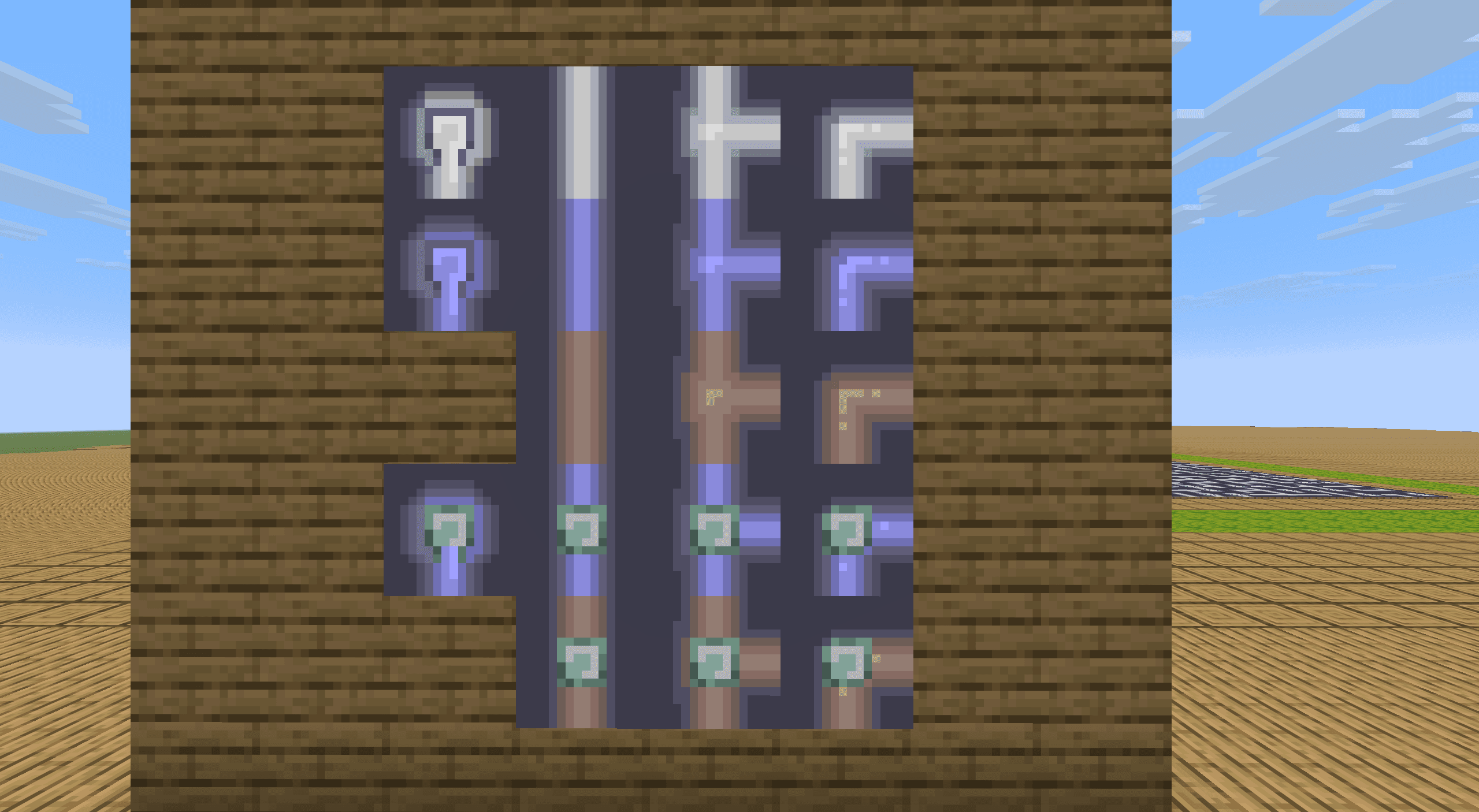
Among them, map0~3It's dry,4~7It's moist,9~11It is a cycle (obviously a grid that only connects one edge cannot be part of a cycle, so 8 is skipped);12~15It's a water source,17~19It's the water source loop. The map material numbers are in the following order.
If the materials produced by readers have different directions or occupy different map IDs, the ID and display direction may need to be additionally corrected in Section 4.3.
- Map 0, a point. (The one made here is downward)
- Map 1, a straight line. (The upper-lower connection is made here)
- Map 2, a T-shaped turn. (The ones produced here are top, bottom and right)
- Map 3, a polyline. (The bottom-right connection is made here)
References
[1] Meili Hegeman. Generating Pipes puzzles using maze-generating algorithms[D]. Leiden University, 2022.
[2] Xu Muxian, Hong Seyu. Using Minecraft to restore the pipe game: random tree generation based on Prim algorithm and loop backtracking based on undirected graph. [J/OL]. Feature, 2026, 6(1).